Im Hierarchie-Editor kann eine individuelle Struktur hinterlegt und angepasst werden. Die dort hinterlegte Struktur wird in der GridVis Cloud als seitliche Navigationsleiste angezeigt und dient als zentrales Bedienelement zur automatischen Filterung der angezeigten Daten.
Der Hierarchieeditor wird über den entsprechenden Button in den Einstellungen aufgerufen.
Hinweis
Beachten Sie, dass alle Änderungen im Hierarchieeditor nur temporär gespeichert werden. Die Änderungen werden erst durch betätigen der Schaltfläche Speichern wirksam. Sie können die getätigten Änderungen durch betätigen der Schaltfläche Abbrechen verwerfen.
Grundprinzip der Hierarchie
Die Hierarchie wird entsprechend der hierarchischen Verteilung der Verbrauchsmedien aufgebaut. Ein neuer Knoten dient dabei als Verteiler oder logische Trennung.
Die Aufbereitung der Messdaten, die im Dashboard und im Analyse-Tab visualisiert werden, richtet sich nach der hinterlegten Struktur und den entsprechend zugeordneten Datenpunkten (Messgeräten). Die Aufbereitung erfolgt entsprechend der Baumstruktur mit Vererbung bzw. Summierung in die nächsthöhere Ebene.
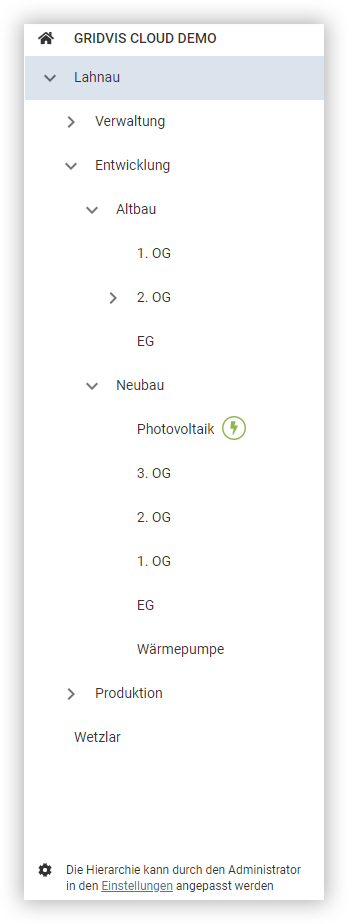
Die angelegten Hierarchieknoten werden als vordefinierte Filter in die Sidebar des Dashboards und in den Analyse-Tab übernommen. Die Auswahl eines Hierarchieknotens in dieser Sidebar filtert automatisch die angezeigten Verbrauchsdaten und zeigt den Verbrauch an diesem Hierarchieknoten an, der entweder direkt von einem Messgerät gemessen oder von der Anwendung als Hierarchiesumme berechnet wurde.
Hierarchiesumme
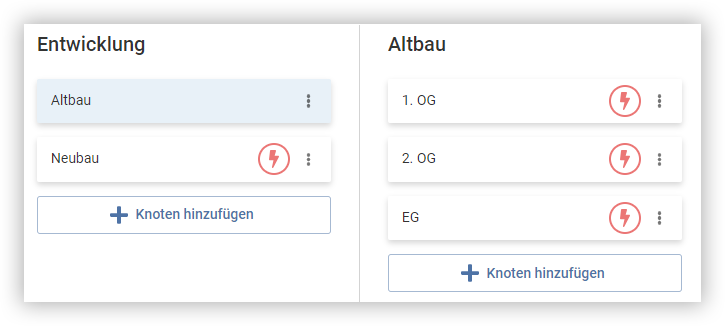
Für einen Hierarchieknoten, der weitere Unterknoten besitzt, wird in der GridVis Cloud eine Summe der Verbräuche der darunter liegenden Knoten gebildet. Sollte eine Verteilstelle keine eigene Messeinrichtung besitzen, so kann diese trotzdem als Knoten in der Hierarchie angelegt werden.
Werden für einen solchen Knoten Unterknoten angelegt und diesen Unterknoten Datenpunkte zugeordnet, so werden in den Visualisierungen im Dashboard und im Analyse-Tab auch die entsprechenden Verbrauchsdaten angezeigt. Diese Daten werden für jedes Medium berechnet, indem die Summe der Verbräuche der Unterknoten ermittelt und dargestellt wird.
Überschreiben der Hierarchiesumme / Übergeordnetes Messgerät
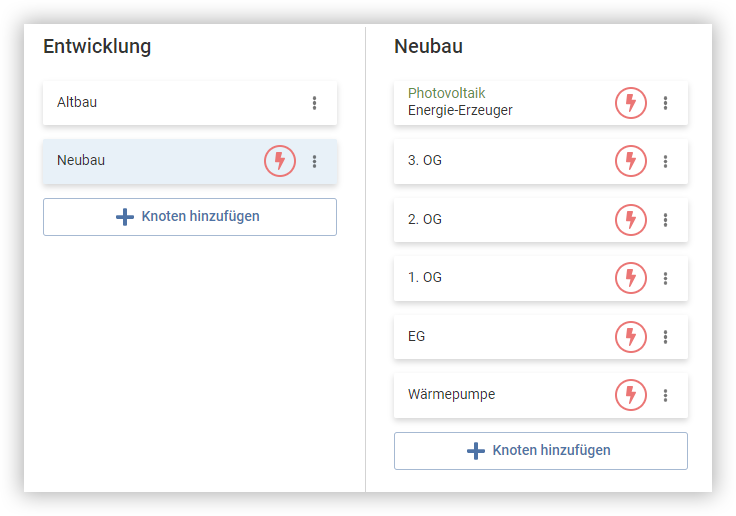
Für einen Elternknoten (oder Oberknoten), dem ein Datenpunkt zugeordnet ist, wird die Hierarchiesumme mit den Messwerten des zugeordneten Datenpunktes überschrieben.
In den Visualisierungen im Dashboard und im Analyse-Tab werden für diesen übergeordneten Knoten die Verbrauchsdaten und Messwerte des zugeordneten Datenpunktes angezeigt.