
Neue Funktionen
| Kurztext | Komponente | Verfügbar in Edition | |
|---|---|---|---|
| Dashboard-Templates, Messwertanalyse & Listenfunktion kompatibel mit modularem Messgerät UMG 801 (ab Version 8.1.20)Die Verwendung des modularen Messgeräts UMG 801 in Dashboards, Gerätelisten und in der Messwertanalyse wurde optimiert und verbessert. Im Fokus der Optimierung standen die Auswahl und Darstellungen der Mess- und Energiewerte des UMG 801. | Geräte | Standard, Expert |
| GridVis-Dienst – HTTPS-Verschlüsselung (ab Version 8.1.20)Die Datenübertragung zwischen GridVis-Dienst und Webbrowser kann ab sofort optional über HTTPS sicher übertragen werden. Die Verschlüsselung erfolgt über ein SSL-Zertifikat. | GridVis-Dienst | Standard, Expert |
| Gerätelisten können direkt im Event Browser geladen werden (ab Version 8.1.20)Im Event Browser können Ereignisse von Geräten sehr detailliert analysiert werden. Mit der Erweiterung ab Version 8.1.20 können nun die vom Benutzer angelegten Gerätelisten im Event Browser ausgewählt werden. Dies ermöglicht einen komfortablen Zusammenschluss an Messgeräten, ohne diese manuell einzeln auszuwählen. | Datenexporte | Standard, Expert |
| Neue Energieträger und Hilfsstoffe (Medien) als Systemvariablen (ab Version 8.1.20)Es wurden neue Systemvariablen für Gase, Treibstoffe und Festbrennstoffe ergänzt. Die Systemvariablen können im Daten-Import, virtuellen Gerät, OPC UA-Client und für digitale Eingänge der Messgeräte ausgewählt werden. | Projekt | Essentials, Standard, Expert |
| Ländercode-Einstellung pro Benutzer (ab Version 8.1.20)Für jeden GridVis-Benutzer kann neben der Sprache auch eine Einstellung für das Land vorgenommen werden. Diese Einstellung hilft dabei, die korrekte Darstellung der Werte zu gewährleisten. | Projekt | Standard, Expert |
| Berichtseditor – Gerätetausch erweitert (ab Version 8.1.20)Der Gerätetausch hilft dabei, alle verwendeten Geräte in einem Bericht auszutauschen und diesen Bericht wiederzuverwenden. Hierbei wurden einige Erweiterungen vorgenommen. So ist es jetzt möglich, auch nur einen Teil der Geräte auszutauschen oder alle Geräte über einen Klick zuzuweisen. | Berichtseditor | Expert |
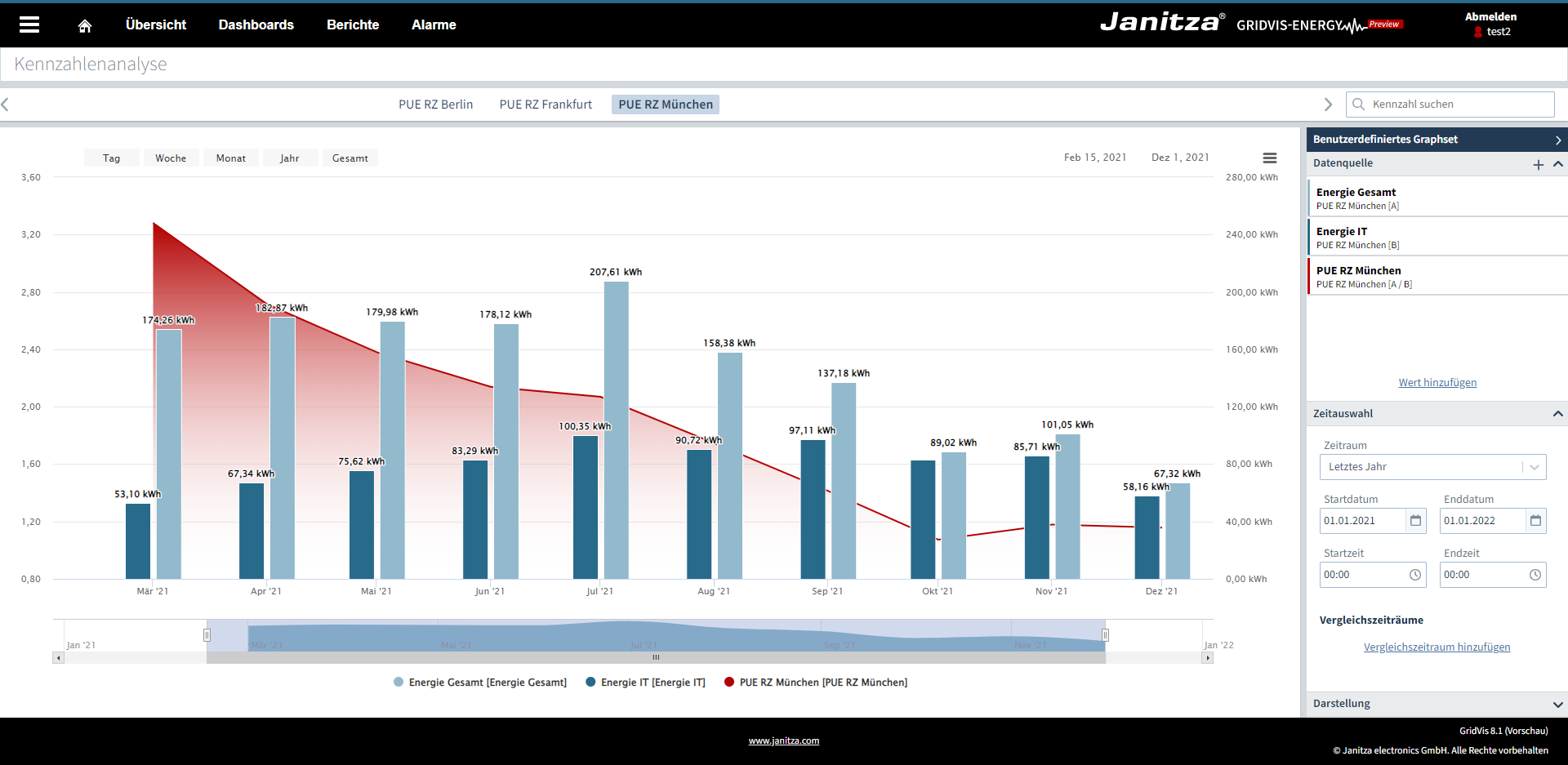
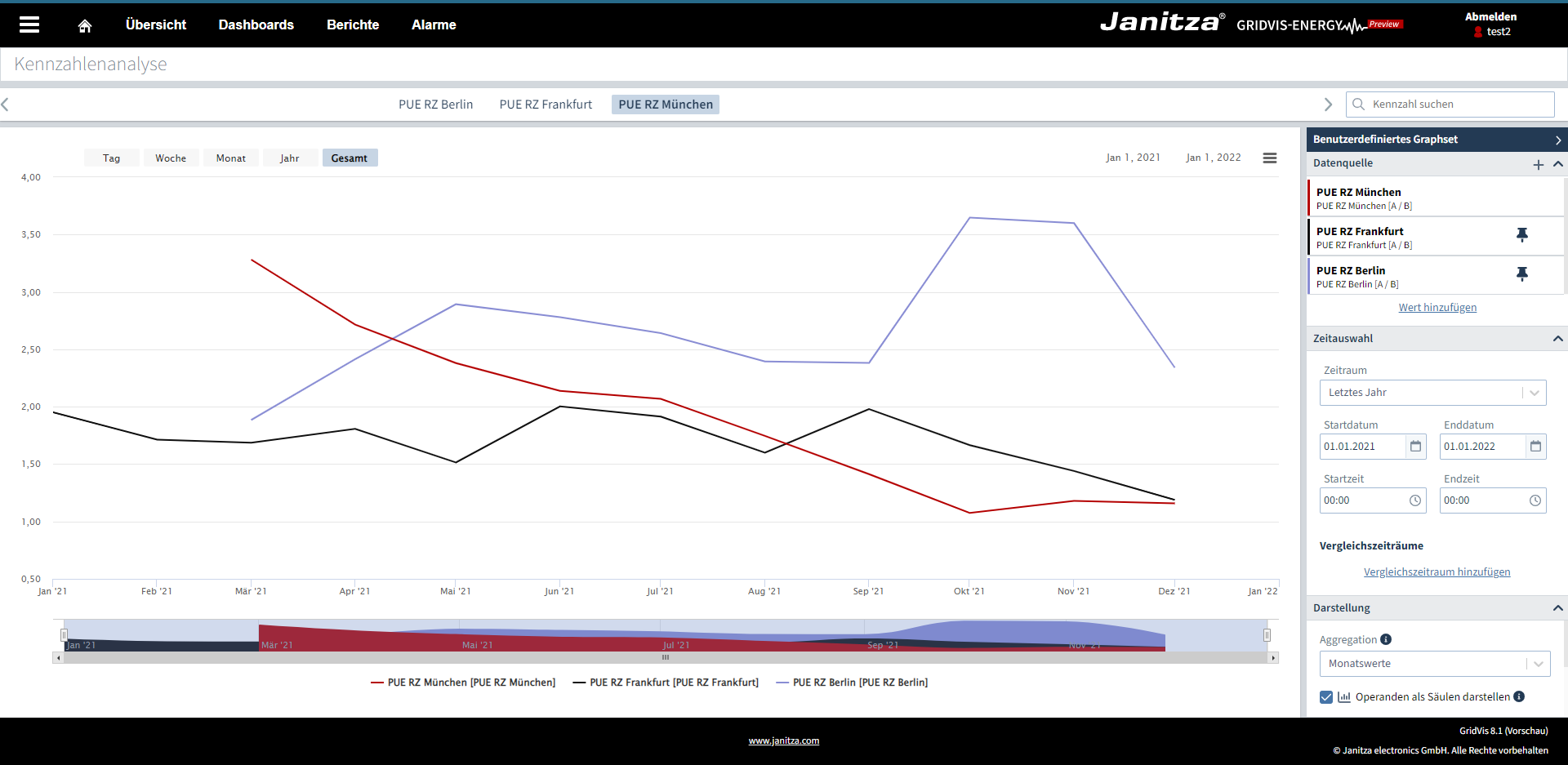
KennzahlenanalyseMit der neuen Kennzahlenanalyse können alle erstellten Kennzahlen projektübergreifend in einer Graph-Funktion ausgewertet werden. Die Funktion kann direkt im Menü unter Kennzahlenanalyse aufgerufen werden. Kennzahlen können nun aggregiert werden (z. B. auf Tageswerte). Damit ist es möglich, Kennzahlen in unterschiedlichen Zeiteinheiten zu berechnen und darzustellen. Mit den neuen Vergleichszeiträumen können zudem Kennzahlen in unterschiedlichen Zeiträumen in einem Graph dargestellt werden. Mit Hilfe der bekannten Pinn-Funktion in der Messwertanalyse können nun auch unterschiedliche Kennzahlen miteinander verglichen werden. Mit dieser Funktion ist es dann z. B. möglich, Produktionslinien oder Standorte miteinander zu vergleichen.
| Kennzahlen | Expert | |
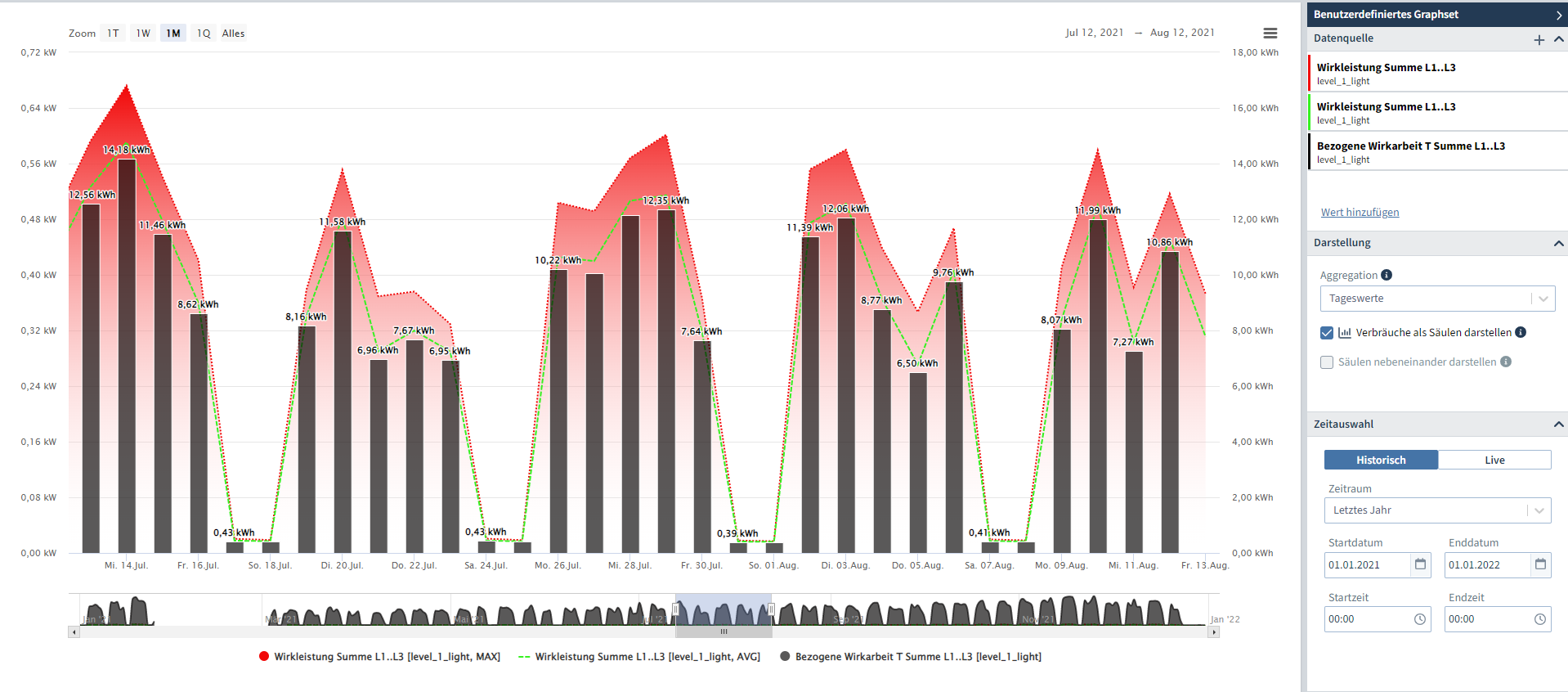
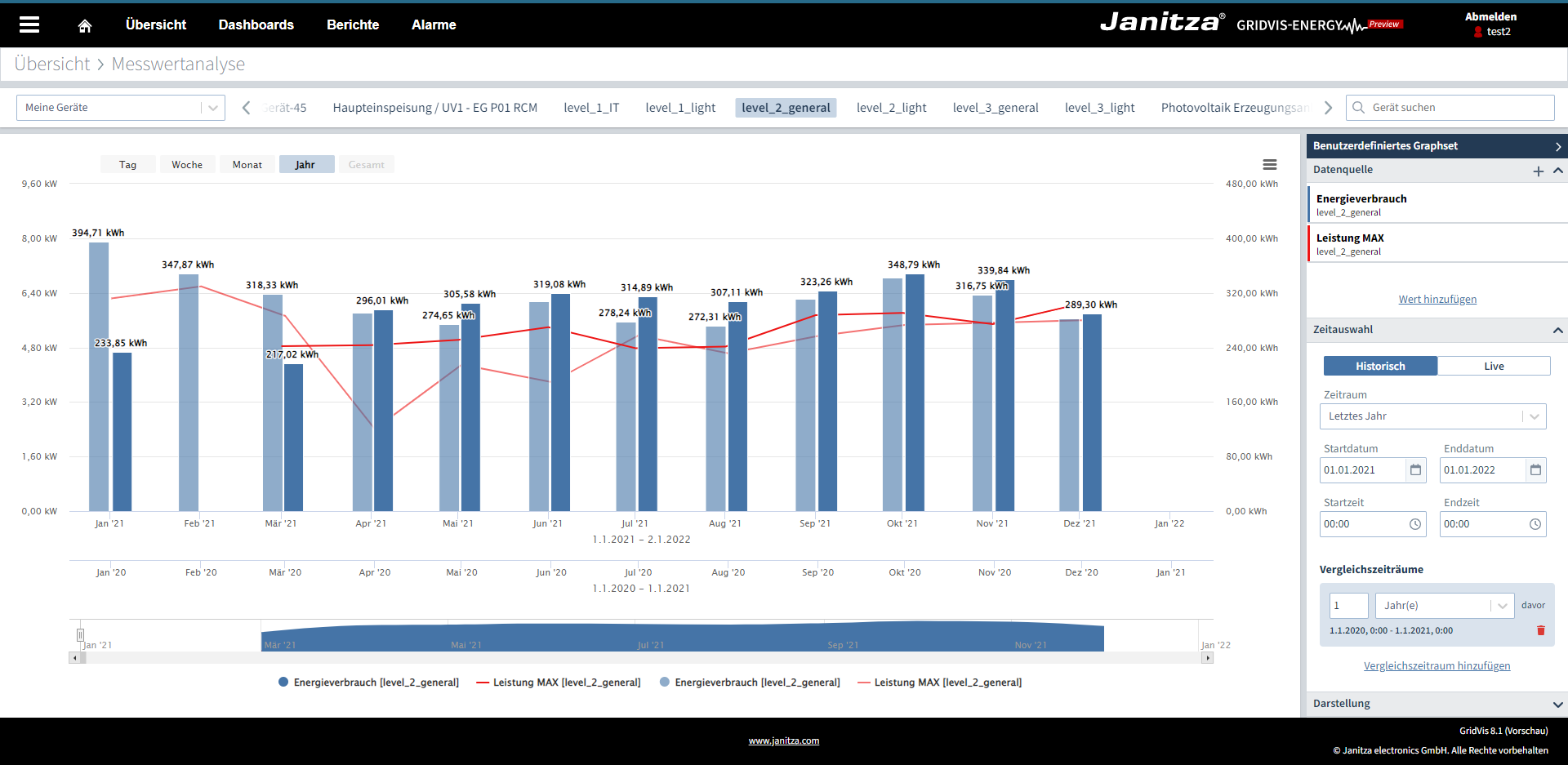
MesswertanalyseDie Messwertanalyse kann ab sofort direkt über das Menü unter Messwertanalyse aufgerufen werden. Zudem können Verbräuche als Säulen gezeichnet werden. Mit Hilfe des Vergleichszeitraums können bis zu drei Zeiträume in einem Graph dargestellt werden.
| Messwerte | Standard, Expert | |
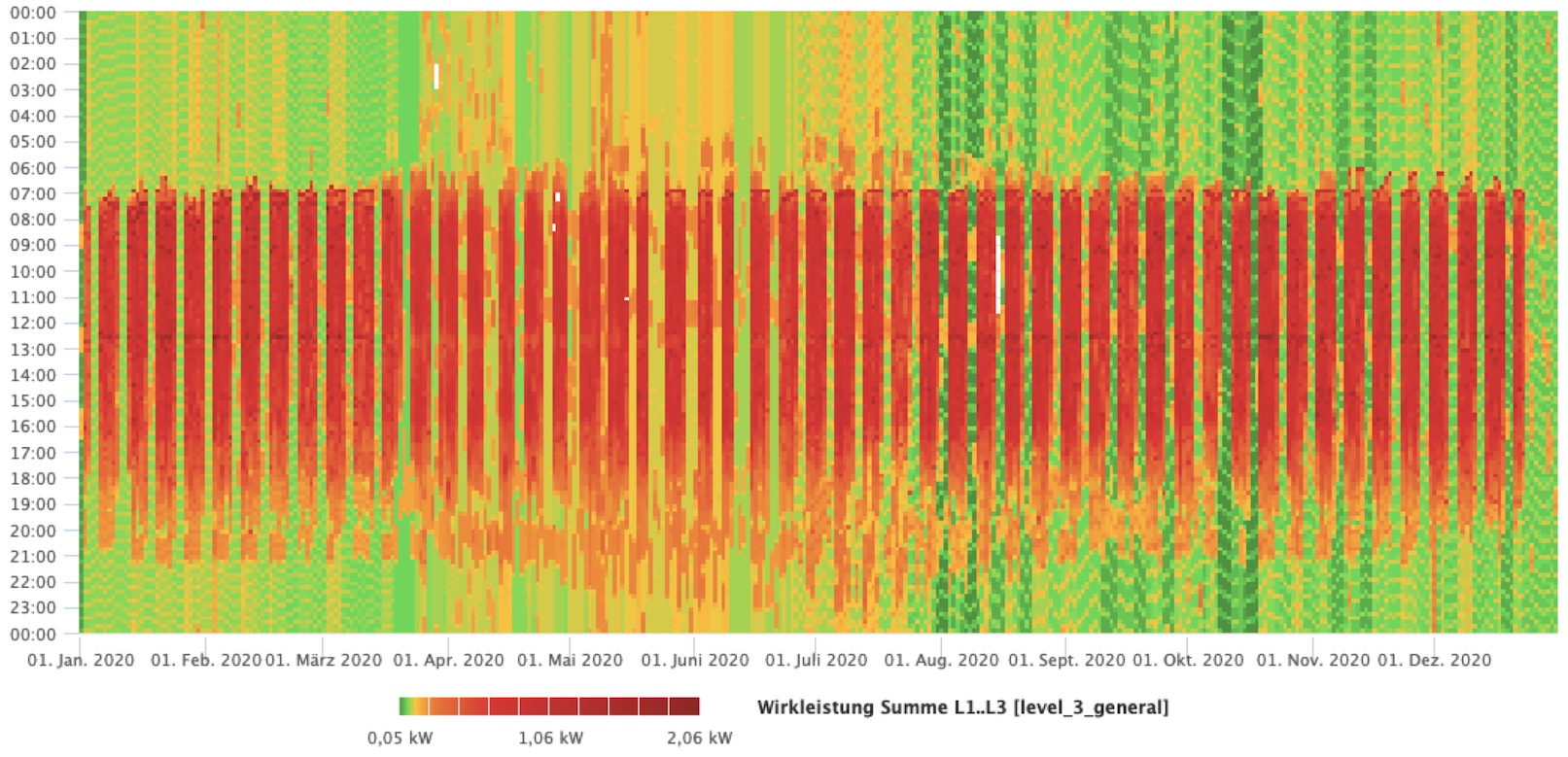
Berichtseditor – HeatmapDas Visualisierungsobjekt kann einen Messwert über einen Zeitraum darstellen und farblich kodieren. Hierdurch können große Datenmengen intuitiv überblickt und besonders markante Werte identifiziert werden. Es können beliebige Zeiträume wie Tage, Wochen, Monate oder auch Jahre visualisiert werden.
| Berichtseditor | Expert | |
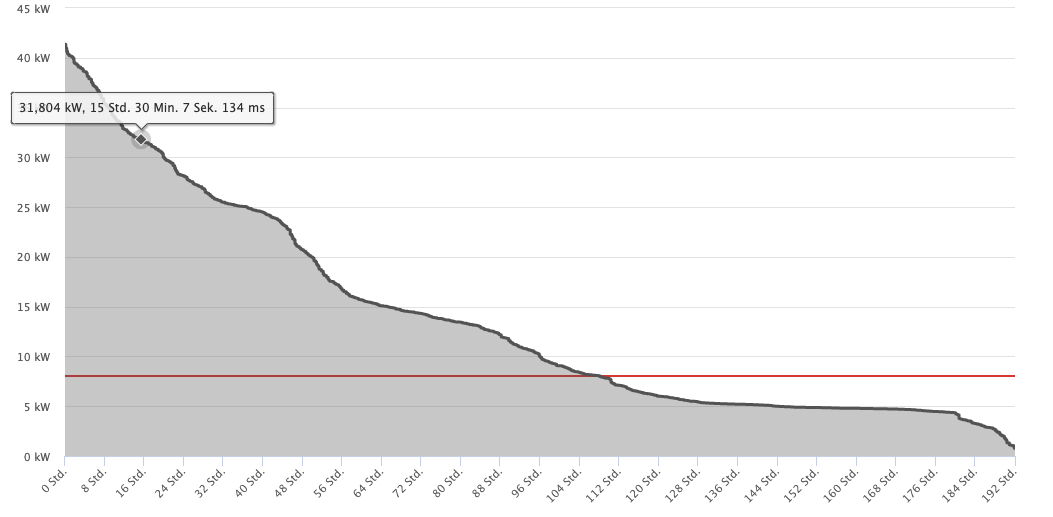
Berichtseditor – DauerlinieDie Dauerlinie ist eine statistische Auswertung von Messwerten, beispielsweise um Lastgänge zu visualisieren. Hierbei werden die Daten nach ihrer Häufigkeit sortiert, um zu erfahren welche Wertebereiche wie häufig aufgetreten sind. Zusätzlich können die Messwerte auch im zeitlichen Verlauf eingeblendet werden.
| Berichtseditor | Expert | |
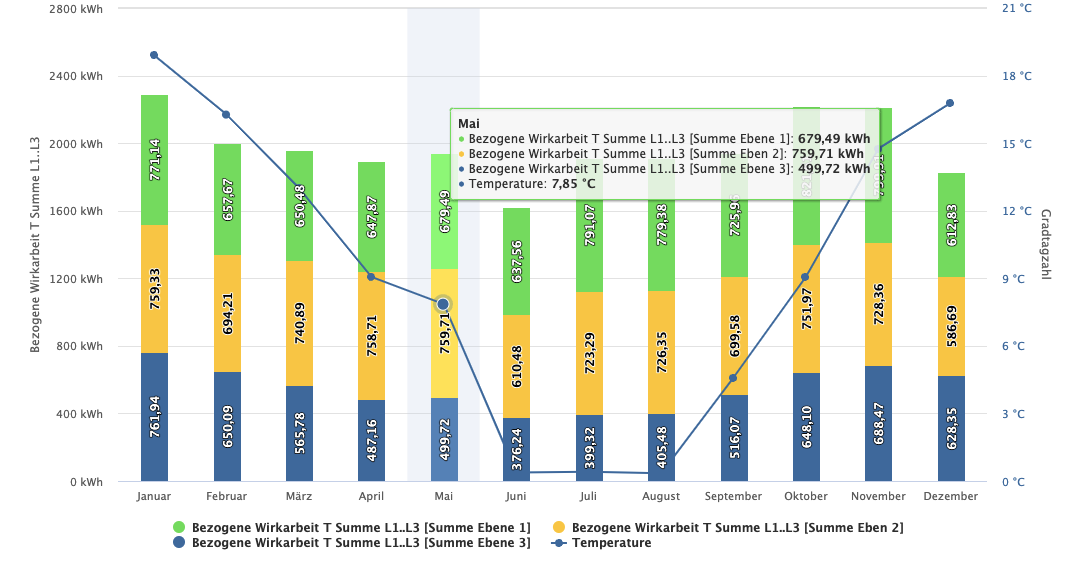
Berichtseditor – Säulendiagramm (gestapelt)Mit dem gestapelten Säulendiagramm können bis zu 10 Werte vom selben Typ übereinander visualisiert werden. Zusätzlich kann ein weiterer Wert ausgewählt werden und als Referenzlinie dargestellt werden. Dieser Referenzwert wird auf einer zweiten Y-Achse dargestellt und kann separat skaliert werden.
| Berichtseditor | Expert | |
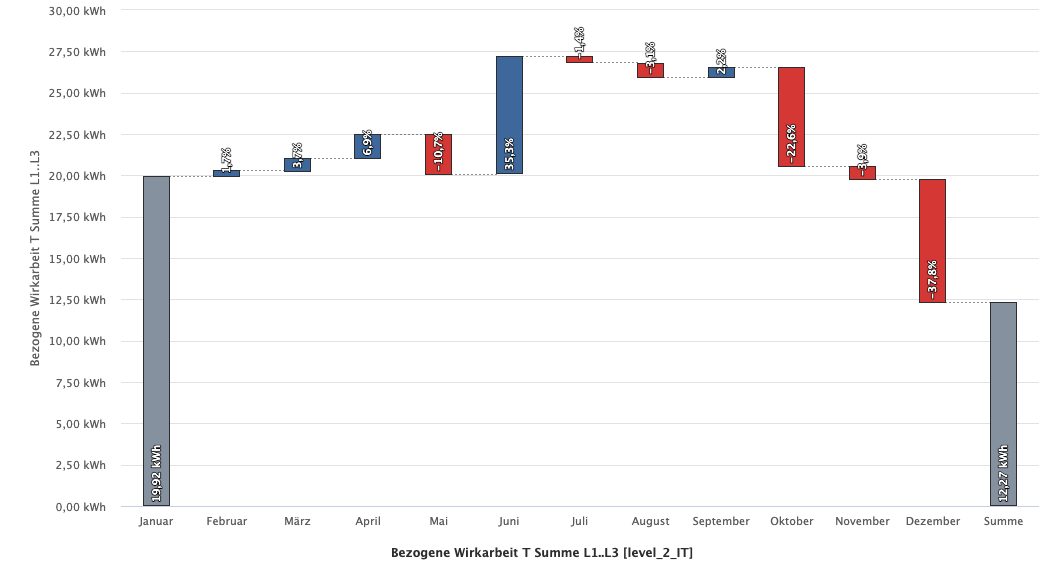
Berichtseditor – WasserfalldiagrammDas Wasserfalldiagramm hilft dabei sofort zu erkennen, wie die Zu- und Abnahme eines Wertes im zeitlichen Verlauf erfolgt ist. Dabei kann zwischen Stunden-, Wochen-, Monats-, Quartals- oder Jahresauswertungen gewählt werden. Die Veränderungen können sowohl in Prozent als auch in absoluten Werten dargestellt werden.
| Berichtseditor | Expert | |
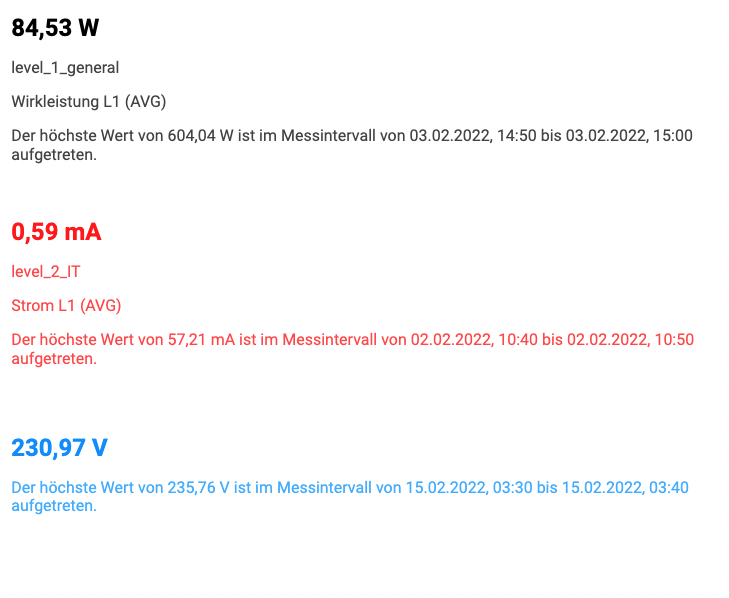
Berichtseditor – Zeitstempel der höchsten maximalen DurchschnittswerteIm Objekt “numerischer Wert” besteht nun die Möglichkeit, den höchsten Wert mit Zeitstempel im gewählten Zeitraum anzuzeigen.
| Berichtseditor | Expert | |
Geräte in Projekte importieren und exportierenMit dem neuen Import und Export von Geräten können einzelne Geräte aus einem Projekt in ein anderes Projekt übertragen werden. | Projekt | Essentials, Standard, Expert | |
Auslieferung generischer Modbusprofile von FremdherstellernFür viele Modbus-Geräte von Fremdherstellern können vordefinierte Profile ausgewählt und direkt verwendet werden. | Generischer Modbus | Expert | |
Einfache Zuweisung von generischen ModbusprofilenÜber die Desktop-Geräteliste können generische Modbusprofile direkt zugewiesen werden. Die Erweiterung bietet bei einer Inbetriebnahme mit Modbusprofilen z. B. für Fremdhersteller einen enormen Zeitvorteil. | Generischer Modbus | Expert | |
Virtuelles Gerät unterstützt Messwerte mit unterschiedlichen ZeitbasenDas Virtuelle Gerät unterstützt nun Messwerte mit unterschiedlichen Zeitbasen. Diese können z. B. entstehen, wenn Aufzeichnungen der Geräte unterschiedlich sind oder wenn die Aufzeichnungsdichte in einem Zeitraum nicht einheitlich ist. Dies kann beispielsweise vorkommen wenn Sie ältere Messdaten verdichten (Datenbankaktion). | Geräte | Standard, Expert |

Optimierungen und Fehlerkorrekturen (Changelog)
Hinweis
Nach einem Software-Update muss eine Datenbank-Migration durchgeführt werden (ab Version 8.1.20).
| Kurztext | Komponente | Betrifft | Version | |
|---|---|---|---|---|
 | Fehlerkorrektur: Speicheroptimierung bei Gerätekommunikation | Geräte | GridVis-Desktop / GridVis-Web | 8.1.25 |
| Funktionsanpassung DI: MSCONS 2.4a Dateien werden unterstützt | Daten-Import | GridVis-Desktop / GridVis-Web | 8.1.25 |
| Fehlerkorrektur Datenbankaktion Geräte löschen | Datenbanken | GridVis-Desktop | 8.1.24 |
| Fehlerkorrektur Eventbrowser: Wellenformanalysechart wurde in der GridVis-Desktop nicht angezeigt | Daten-Exporte/Reporte | GridVis-Desktop | 8.1.24 |
| Fehlerkorrektur: Kanäle wurden bei Generischem Modbus, UMG 806, RCM 202-AB, ProData I und UMG 20CM falsch zugeordnet | Geräte | GridVis-Desktop / GridVis-Web | 8.1.23 |
| Fehlerkorrektur Datenexport: Der Datenexport "Verbrauchsabrechnung" konnte in der Berichtsverwaltung nicht geladen werden | Datenexporte | GridVis-Desktop | 8.1.22 |
| Fehlerkorrektur: Berichtsverwaltung Stabilität verbessert | Berichtsverwaltung | GridVis-Web | 8.1.21 |
| Funktionsoptimierung Datenbank: Janitza DB (Update auf diese Version erfordert eine Datenbank-Migration) | Datenbank | GridVis-Desktop / GridVis-Web | 8.1.20 |
| Fehlerkorrektur RCM Report UMG 801 Auswahl | Daten-Exporte/Reporte | GridVis-Desktop | 8.1.20 |
| Funktionserweiterung UMG 801: Geräte-/ Modul-, Messgruppen- und Kanalnamen werden bei bestehenden Geräten in neuen Projekten übernommen | Geräte | GridVis-Desktop / GridVis-Web | 8.1.20 |
| Funktionserweiterung Systemvariablen: neue Verbrauchstypen hinzugefügt | Projekt | GridVis-Desktop / GridVis-Web | 8.1.20 |
| Funktionsoptimierung Sicherheit: Jetty 10 Update | GridVis | GridVis-Web | 8.1.20 |
| Funktionsoptimierung Listenfunktion: neue Geräteauswahl mit Baumstruktur | Geräteübersicht | GridVis-Web | 8.1.20 |
| Sicherheitsupdate: Veraltet Apache POI wurde entfernt | Datenexporte | GridVis-Desktop | 8.1.20 |
| Fehlerkorrektur Dashboard-Templates: Kompatibilität mit UMG 801 | Dashboards | GridVis-Web | 8.1.20 |
| Fehlerkorrektur Berichtseditor: Kompatibilität mit UMG 801 | Berichtseditor | GridVis-Web | 8.1.20 |
| Funktionserweiterung OPC-UA Client: Es kann ein Servername im Pfad eingegeben werden | OPC | GridVis-Desktop / GridVis-Web | 8.1.20 |
| Funktionsoptimierung Energiewerte: unrealistische Werte werden ignoriert | GridVis | GridVis-Desktop / GridVis-Web | 8.1.20 |
| Fehlerkorrektur Datenexporte: Es wurde ein Fehler in der Jahresauswertung für Energiekosten & Verbrauch behoben | Daten-Exporte/Reporte | GridVis-Desktop | 8.1.20 |
| Funktionserweiterung UMG 96PQ-L: Parität und Stopp-Bit sind in der Verbindungseinstellung konfigurierbar | Geräte | GridVis-Desktop / GridVis-Web | 8.1.20 |
| Fehlerkorrektur Berichtseditor: Es wurde ein Fehler bei der Skalierung von benutzerdefinierten Werten behoben | Berichtseditor | GridVis-Web | 8.1.20 |
| Funktionserweiterung Gerätekonfiguration: PRO-Geräteserie mit Firmware 5.028 und höher unterstützt neues Einstellungsfeld "Geräteinfo" | Geräte | GridVis-Desktop / GridVis-Web | 8.1.20 |
| Funktionsänderung UMG 801: Änderung der Geräte- und Modul Icons | Geräte | GridVis-Desktop / GridVis-Web | 8.1.20 |
| Funktionserweiterung Benutzerprofil: Pro Benutzer kann ein Ländercode eingestellt werden | Projekt | GridVis-Desktop / GridVis-Web | 8.1.20 |
| Fehlerbehebung Gerätekonfiguration: Behebung eines Fehlers, durch den bei bestimmten Einstellung für Bacnet die Konfiguration nicht vom Gerät geladen werden konnte | Geräte | GridVis-Desktop / GridVis-Web | 8.1.20 |
| Funktionsanpassung MSCONS Export: AGI Segment optional verwendbar | Daten-Exporte/Reporte | GridVis-Desktop | 8.1.20 |
| Fehlerkorrektur Systemvariablen: gelieferte Wirkarbeit Intervall kann ausgewählt werden | Daten Import | GridVis-Desktop / GridVis-Web | 8.1.20 |
| Fehlerkorrektur Wertebaum Desktop: Zeitbereich springt nicht mehr bei einem Wechsel | Geräte | GridVis-Desktop | 8.1.20 |
| Fehlerkorrektur Geräte hinzufügen: angelegte Geräte werden in das richtige Projekt abgelegt | Projekt | GridVis-Desktop / GridVis-Web | 8.1.20 |
| Funktionserweiterung Web Server: https Verschlüsselung kann optional aktiviert werden | GridVis-Dienst | GridVis-Web | 8.1.20 |
| Funktionserweiterungen Systemvariablen: Gradtagszahl & Heizgradtage hinzugefügt | Projekt | GridVis-Desktop / GridVis-Web | 8.1.20 |
| Fehlerkorrektur Janitza ID Server: Registrierungsprozess wird immer vollständig abgeschlossen | ID-Server | GridVis-Desktop / GridVis-Web | 8.1.20 |
| Fehlerkorrektur Sankey: Es wurde ein Fehler behoben, der eine falsche Kalenderwoche angezeigt hat | Sankey | GridVis-Web | 8.1.20 |
| Funktionserweiterung UMG 801: Das modulare Messgerät wird jetzt in der Messwertanalyse und Listenfunktion unterstützt | Geräte | GridVis-Web | 8.1.20 |
| Fehlerkorrektur Hochverfügbarkeitsreport: Es wurde ein Fehler im Zusammenhang mit dem Datum in der Ausfallmatrix behoben | Daten-Exporte/Reporte | GridVis-Desktop | 8.1.20 |
| Funktionserweiterung Auslastungsreport: Pro Gerät kann die zugesicherte Leistung eingetragen werden | Daten-Exporte/Reporte | GridVis-Desktop | 8.1.20 |
| Funktionsanpassung Inbetriebnahmereport: Die Spalte "ID" zeigt nun die GridVis-interne Geräte ID | Daten-Exporte/Reporte | GridVis-Desktop | 8.1.20 |
| Funktionserweiterung Berichtseditor: Es müssen nicht mehr alle Geräte im Gerätetausch zugewiesen werden | Berichtseditor | GridVis-Web | 8.1.20 |
| Funktionserweiterung Berichtseditor: Im Gerätetausch können alle Geräte beibehalten werden | Berichtseditor | GridVis-Web | 8.1.20 |
| Funktionserweiterung Berichtseditor: Sind mehrere Objekte selektiert, kann für die Selektion ein Gerätetausch durchgeführt werden | Berichtseditor | GridVis-Web | 8.1.20 |
| Funktionserweiterung Event Browser: Es werden alle neuen Ereignisse des UMG96 PQ-L unterstützt | Daten-Exporte/Reporte | GridVis-Desktop | 8.1.20 |
| Fehlerkorrektur Berichtseditor: Es wurde ein Problem mit erstellten Berichten und dem Wochenbeginn behoben | Berichtseditor | GridVis-Web | 8.1.20 |
| Funktionserweiterung Export der Messwerte v2: Optional können jetzt auch MIN und MAX Werte ausgegeben werden | Daten-Exporte/Reporte | GridVis-Desktop | 8.1.20 |
| Fehlerkorrektur Gerätekonfiguration: Behebung eines Fehlers, der dazu führte dass unter bestimmten Umständen die Eingabefelder für IP-Adressen nicht editierbar gestellt wurden | Geräte | GridVis-Desktop | 8.1.20 |
| Funktionserweiterung Datenexporte: Die Geräte können auf den Gerätetyp gefiltert werden | Daten-Exporte/Reporte | GridVis-Desktop | 8.1.20 |
| Funktionserweiterung Auslastungsreport: Die Leistungsreserve kann überwacht werden | Daten-Exporte/Reporte | GridVis-Desktop | 8.1.20 |
| Funktionserweiterung Event Browser: Es steht eine neue Spalte zur Anzeige des Auslösers eines Ereignisses zur Verfügung | Daten-Exporte/Reporte | GridVis-Desktop | 8.1.20 |
| Funktionserweiterung Event Browser: erstellte Listen können direkt in den Event Browser geladen werden | Daten-Exporte/Reporte | GridVis-Desktop | 8.1.20 |
| Funktionserweiterung Berichtseditor: Beim ersten Starten des Berichtseditors wird ein Einführungsdialog angezeigt | Berichtseditor | GridVis-Web | 8.1.20 |
| Fehlerkorrektur SQL-Verbindungshandling | Datenbank | GridVis-Desktop / GridVis-Web | 8.1.6 |
| Fehlerkorrektur: Nutzung des Windows-Zertifikatsspeichers | Installer | GridVis-Desktop / GridVis-Web | 8.1.6 |
| Fehlerkorrektur Installer: Auswahl des Arbeitsspeichers | Installer | GridVis-Desktop / GridVis-Web | 8.1.5 |
| Fehlerkorrektur Projekt laden: Projekte können wieder vollständig geladen werden | Projekt | GridVis-Desktop / GridVis-Web | 8.1.4 |
| Fehlerkorrektur Graphischer Jasic-Editor: Behebung eines Bugs durch den bei bestimmten Abfolgen in der Bearbeitung von Komponenten nicht alle Änderungen des Programms korrekt gespeichert wurden | Jasic | GridVis-Desktop | 8.1.3 |
| Funktionsoptimierung Geräte-Import: Importzeit verbessert | Projekt | GridVis-Desktop / GridVis-Web | 8.1.3 |
| Fehlerkorrektur Daten-Import: Zeit Umstellung führt zu keinen Datenlücken mehr | Daten-Import | GridVis-Desktop / GridVis-Web | 8.1.3 |
| Fehlerkorrektur UMG 801: doppelte Geräte bei SQL-Projekten | Geräte | GridVis-Desktop | 8.1.2 |
| Fehlerkorrektur Geräte-Import: UMG 801 & SQL-Datenbanken werden unterstützt | Projekt | GridVis-Desktop / GridVis-Web | 8.1.2 |
| Fehlerkorrektur virtuelles Gerät: Umgang mit verschachtelten Messwerten wurde robuster gemacht | Geräte | GridVis-Desktop | 8.1.2 |
| Fehlerkorrektur Export der Messwerte: Es gab ein Problem mit virtuellen Geräten | Daten-Exporte/Reporte | GridVis-Desktop | 8.1.1 |
| Fehlerkorrektur Berichtseditor: Es wurde ein Fehler bei der Skalierung im Tabellenobjekt behoben | Berichtseditor | GridVis-Web | 8.1.1 |
| Fehlerkorrektur Berichtsverwaltung: Unter manchen Umständen konnte die Liste der Berichte nicht geladen werden | Berichtsverwaltung | GridVis-Web | 8.1.1 |
| Fehlerkorrektur Berichtseditor: Es wurde ein Fehler im Zusammenhang mit Leistungswerten eines virtuellen Geräts im Tabellen Objekt behoben | Berichtseditor | GridVis-Web | 8.1.1 |
| Funktionserweiterung Auslastungsreport: Das UMG-20 CM steht im Auslastungsreport zur Verfügung | Daten-Exporte/Reporte | GridVis-Desktop | 8.1.1 |
| Fehlerkorrektur: Es wurde ein Fehler im Datenexport Energie-Rechnung im Zusammenhang mit Tarifen behoben | Daten-Exporte/Reporte | GridVis-Desktop | 8.1.1 |
| Fehlerkorrektur Aufzeichnungskonfiguration für UMG 96RM-Serie, UMG 103CBM und Prodata 2 | Aufzeichnungskonfiguration | GridVis-Desktop | 8.1.1 |
| Fehlerkorrektur VD kann mit online aufgezeichneten Werten umgehen | Geräte | GridVis-Desktop | 8.1.1 |
| Fehlerkorrektur Datenexport: Es wurde ein Problem mit dem UMG 801 und der Energie- und Verbrauchsübersicht behoben | Daten-Exporte/Reporte | GridVis-Desktop | 8.1.0 |
| Funktionserweiterung Messwertanalyse im WEB: es können bis 2 Vergleichszeiträume ausgewählt werden | Messwertanalyse | GridVis-Web | 8.1.0 |
| Fehlerkorrektur DI MSCONS Import: Werte können in Dashboard Widgets verwendet werden | DI | GridVis-Desktop | 8.1.0 |
| Funktionserweiterung Kennzahlenanalyse: KPIs können aggregiert, mit anderen KPIs gegenübergestellt oder mit Vergleichszeitraum dargestellt werden | Kennzahlen | GridVis-Web | 8.1.0 |
| Funktionserweiterung UMG 96-PQ-L: Vergleicher können benutzer-definierte Ereignisse auslösen | Geräte | GridVis-Desktop / GridVis-Web | 8.1.0 |
| Fehlerkorrektur REST API: Zählerstände werden richtig gerundet | REST API | GridVis-Web | 8.1.0 |
| Fehlerkorrektur SQL: Ports wurden nicht richtig geschlossen | Datenbanken | GridVis-Desktop | 8.1.0 |
| Fehlerkorrektur Messwertauswahl: Zählerstände ohne Rücklaufsperre wurden nicht richtig aggregiert | Messwertanalyse | GridVis-Web | 8.1.0 |
| Funktionsanpassung virtuelles Gerät: Messwerte können unterschiedliche Zeitbasen aufweisen | Geräte | GridVis-Desktop | 8.1.0 |
| Funktionserweiterung: Geräte mit Modbus-Verbindung erlauben Adressenbereich von 1 bis 255 | Geräte | GridVis-Desktop / GridVis-Web | 8.1.0 |
| Fehlerkorrektur Messwertanalyse: OPC UA Live Werte können ausgewählt und dargestellt werden | OPC | GridVis-Desktop / GridVis-Web | 8.1.0 |
| Fehlerkorrektur Projekt Import: MID Daten werden mit exportiert und importiert | Projekt | GridVis-Desktop / GridVis-Web | 8.1.0 |
| Funktionsanpassung Installer: Installer wurde signiert | Installer | GridVis-Desktop / GridVis-Web | 8.1.0 |
| Funktionserweiterung Datenbank Aktion: Geräte in Projekt importieren/exportieren | Datenbanken | GridVis-Desktop | 8.1.0 |
| Funktionsanpassung Messwertanalyse im WEB: Zoom und sichtbare Werte bleiben beim Gerätewechsel gespeichert | Messwertanalyse | GridVis-Web | 8.1.0 |
| Funktionsanpassung Datenexport: Die Energie- Verbrauchsübersicht wurde für die Verwendung mit dem UMG 801 optimiert | Daten-Exporte/Reporte | GridVis-Desktop | 8.1.0 |
| Funktionserweiterung Berichtseditor: Im Numerischen Wert kann kann der Auftrittszeitpunkt des höchsten AVG Werts eingeblendet werden | Berichtseditor | GridVis-Web | 8.1.0 |
| Fehlerkorrektur: Es wurde ein Fehler beim Export der Messwerte V2 bei zu vielen Messwerten behoben | Daten-Exporte/Reporte | GridVis-Desktop | 8.1.0 |
| Funktionsanpassung Export der Messwerte v2: Die Kopfzeile wird jetzt fixiert dargestellt | Daten-Exporte/Reporte | GridVis-Desktop | 8.1.0 |
| Funktionserweiterung Berichtseditor: neues Objekt Dauerlinie | Berichtseditor | GridVis-Web | 8.1.0 |
| Fehlerkorrektur Datenbank Migrationsprozess: Vor einer Migration erscheint im Desktop Projektbaum ein Hinweis | Datenbanken | GridVis-Desktop | 8.1.0 |
| Funktionsanpassung Listenfunktion im WEB: Messwertanalyse und Gerätekonfiguration kann mit einem Rechtklick in einem separaten Tab geöffnet werden | Geräteübersicht | GridVis-Web | 8.1.0 |
| Fehlerkorrektur Messwertanalyse im WEB: CSV Export gibt keine doppelten Werte mehr aus | Messwertanalyse | GridVis-Web | 8.1.0 |
| Funktionsanpassung Messwertauswahl im WEB: Verbräuche können auch ohne Aggregation dargestellt werden | Messwertanalyse | GridVis-Web | 8.1.0 |
| Funktionsanpassung Messwertanalyse im WEB: gleiche Einheiten können optional im Graphen zusammen gefasst werden | Messwertanalyse | GridVis-Web | 8.1.0 |
| Fehlerkorrektur Datenexport LET Report: Grenzwerte lassen sich wieder bearbeiten | Daten-Exporte/Reporte | GridVis-Desktop | 8.1.0 |
| Funktionserweiterung UMG 96-PQ-L: Vergleicher können benutzer-definierte Ereignisse auslösen | Geräte | GridVis-Desktop / GridVis-Web | 8.1.0 |
| Funktionsanpassung Messwertauswahl WEB: Aggregationsfunktion wurde für Zählerstände deaktiviert und steht immer auf MAX | Messwertanalyse | GridVis-Web | 8.1.0 |
| Fehlerkorrektur AD: SSL-Zertifikate Import. | Active Directory | GridVis-Desktop | 8.1.0 |
| Funktionsanpassung Berichtseditor: Shortcut Verhalten wurde optimiert | Berichtseditor | GridVis-Web | 8.1.0 |
| Funktionserweiterung Berichtseditor: neues Menü im Berichtseditor zum Öffnen bestimmter Funktionen | Berichtseditor | GridVis-Web | 8.1.0 |
| Funktionsanpassung Listenfunktion im WEB: Grenzwertfilter können mit Nachkommastellen hinterlegt werden | Geräteübersicht | GridVis-Web | 8.1.0 |
| Fehlerkorrektur Datenbank MSSQL: Es wurde ein Problem mit MSSQL Datenbanken und bestimmten Zeichenketten behoben | Datenbanken | GridVis-Desktop | 8.1.0 |
| Fehlerkorrektur Datenexport Auslastungsreport: keine Fehler mehr bei gelöschten Geräten | Daten-Exporte/Reporte | GridVis-Desktop | 8.1.0 |
| Funktionsanpassung Datenbank: Performance bei Abfragen wurde verbessert | Datenbanken | GridVis-Desktop | 8.1.0 |
| Fehlerkorrektur Datenexport Auslastungsreport: UMG 801 4. Kanal kann genutzt werden | Daten-Exporte/Reporte | GridVis-Desktop | 8.1.0 |
| Funktionserweiterung Berichtseditor: Bericht Export beinhaltet auch Bilder und Grafiken | Berichtseditor | GridVis-Web | 8.1.0 |
| Funktionserweiterung Berichtseditor: Objekt Numerischer Wert kann höchsten/niedrigsten Wert anzeigen | Berichtseditor | GridVis-Web | 8.1.0 |
| Funktionserweiterung Berichtseditor: neues Objekt gestapeltes Säulendiagramm mit Referenzlinie | Berichtseditor | GridVis-Web | 8.1.0 |
| Funktionserweiterung Berichtseditor: neues Objekt Wasserfalldiagramm | Berichtseditor | GridVis-Web | 8.1.0 |
| Funktionsanpassung Berichtseditor: Objekte zeigen an, wenn die angezeigte Datenmenge zu groß ist | Berichtseditor | GridVis-Web | 8.1.0 |
| Funktionserweiterung Messwertanalyse im WEB: aggregierte Verbräuche können als Säule gezeichnet werden | Messwertanalyse | GridVis-Web | 8.1.0 |
| Funktionserweiterung Berichtseditor: neues Objekt Heatmap | Berichtseditor | GridVis-Web | 8.1.0 |
| Fehlerkorrektur Online Recorder: sporadische Fehler in der UI entfernt | Online Recorder | GridVis-Web | 8.1.0 |
| Funktionserweiterung Messwertanalyse im WEB: neue klappbare Sidebar mit erweiterten Darstellungsfunktionen | Messwertanalyse | GridVis-Web | 8.1.0 |
| Funktionserweiterung Lizenzierung: Lizenzierung kann im Dienst über einen Webbrowser gestartet werden | Lizenz | GridVis-Desktop / GridVis-Web | 8.1.0 |
| Funktionserweiterung Lizenzübersicht: mögliches installierbares Release wird angezeigt | Lizenz | GridVis-Desktop / GridVis-Web | 8.1.0 |
| Funktionserweiterung Geräteliste Export Desktop: Modbusprofile können für generische Modbusgeräte direkt zugewiesen werden | Generischer Modbus | GridVis-Desktop | 8.1.0 |
| Funktionserweiterung generisches Modbus: Drittanbieter Profile werden mit ausgeliefert | Generischer Modbus | GridVis-Desktop | 8.1.0 |
| Funktionserweiterung Gerätekonfiguration im WEB: neue Navigationsbar | Geräte | GridVis-Web | 8.1.0 |
| Funktionsanpassung ID Server: Lizenznehmer sehen nur ihre eigene Projekte | ID-Server | GridVis-Desktop / GridVis-Web | 8.1.0 |
| Fehlerkorrektur Berichtseditor: Es wurde ein Fehler behoben bei dem gesperrte Objekte durch Mehrfachselektion verschoben werden konnten | Berichtseditor | GridVis-Web | 8.1.0 |
| Fehlerkorrektur Berichtsmanager: Es wurde ein Fehler behoben bei dem der Link zum aktuellsten Dokument nicht korrekt war | Berichtsverwaltung | GridVis-Web | 8.1.0 |

Technische Änderungen vorbehalten.
Die Inhalte, Leistungsmerkmale und Diagramme der Software-Beschreibung entsprechen nicht immer den konkreten Anwendungsfällen und ändern sich, z. B. bei Weiterentwicklungen der Software. Die Inhalte wurden mit größter Sorgfalt zusammengestellt und entsprechen unserem derzeitigen Informationsstand. Fehler können nicht ausgeschlossen werden.
Gewünschte Leistungsmerkmale und Lieferbedingungen sind nur verbindlich, wenn sie bei Vertragsabschluss ausdrücklich vereinbart werden.
Wiedergegebene Gebrauchsnamen, Handelsnamen und Bezeichnungen obliegen den Richtlinien des Herstellers. Die Janitza electronics GmbH übernimmt keine Verpflichtung, diese Software-Beschreibung auf dem neuesten Stand zu halten. Weitere aktuelle Informationen und Spezifikationen finden Sie auf www.janitza.de.