
Neue Funktionen
| Kurztext | Komponente | Verfügbar in Edition | |
|---|---|---|---|
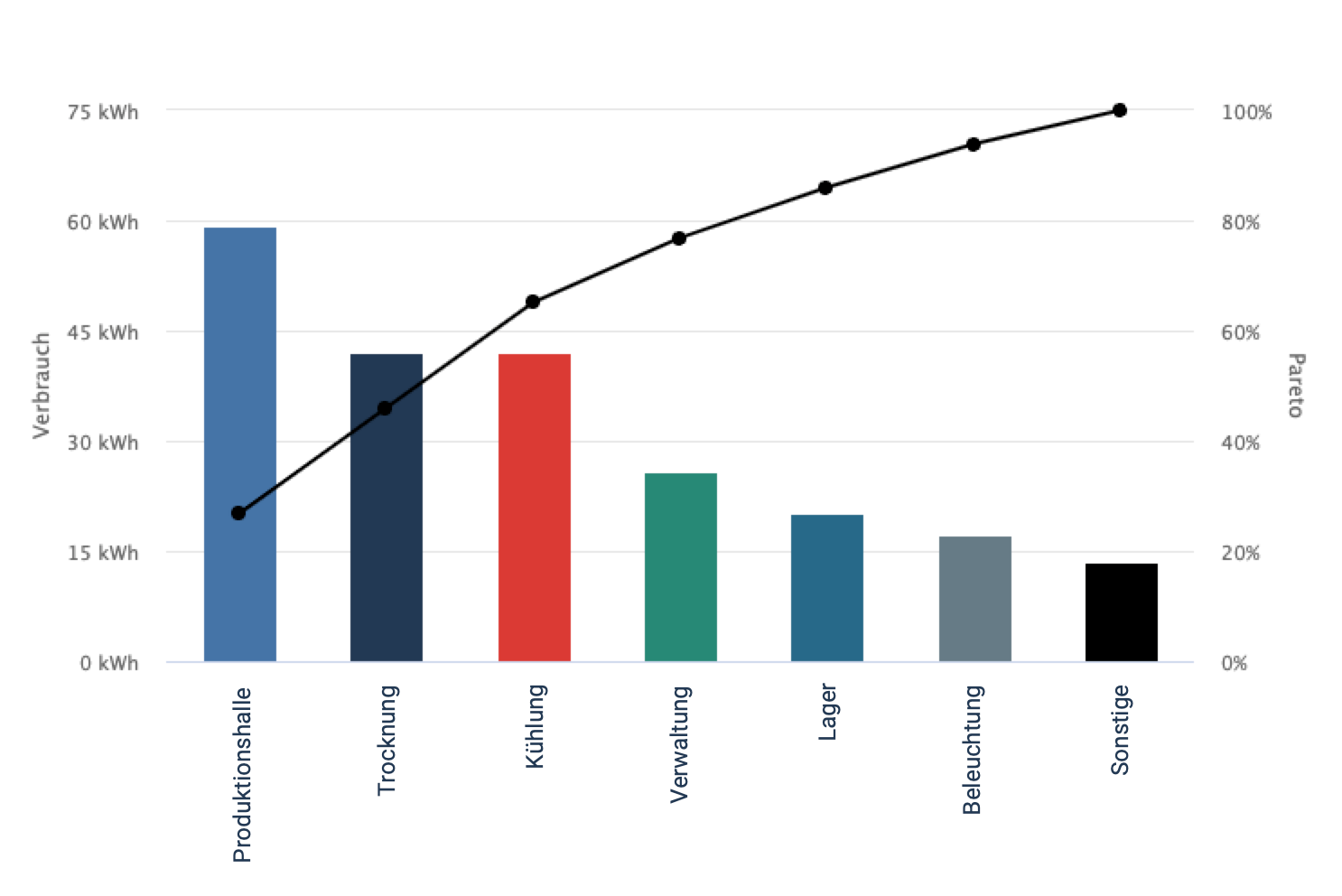
| ABC-Analyse: Die größten Verbraucher identifizieren (ab Version 8.0.60)Die ABC-Analyse hilft dabei, die Verbraucher zu identifizieren, die den größten Anteil am Gesamtverbrauch ausmachen. Der Gesamtverbrauch ergibt sich aus den bis zu 100 auswählbaren Geräten und deren Energiewerten. Mithilfe der zweiten Y-Achse (Pareto) kann abgelesen werden, wieviel Prozent des Gesamtverbrauch bis zum jeweiligen Punkt erreicht wurde.
| Berichtseditor | Expert |
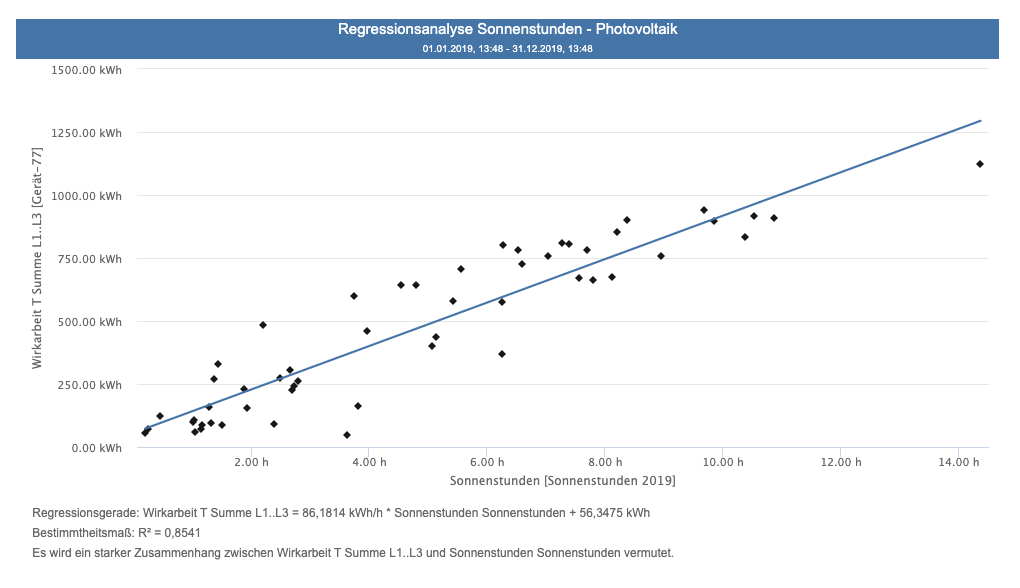
| Abhängigkeiten mit der Regressionsanalyse erkennen (ab Version 8.0.80)Mit dem Objekt zur Regressionsanalyse können Zusammenhänge zwischen Werten untersucht werden. So kann beispielsweise festgestellt werden, ob die produzierte Warenmenge Einfluss auf den Energieverbrauch hatte. Um eine Überprüfung zu starten, müssen die entsprechenden zwei Werte ausgewählt und anschließend eine Regression berechnet werden. Anschließend gibt das angezeigte Diagramm und die Regressionsgerade darüber Auskunft, ob ein Zusammenhang zwischen den Werten besteht und wie ausgeprägt dieser ist. Das Objekt befindet sich aktuell in einem Beta-Stadium, das heißt in Zukunft können hier weitere Veränderungen und Anpassungen stattfinden.
| Berichtseditor | Expert |
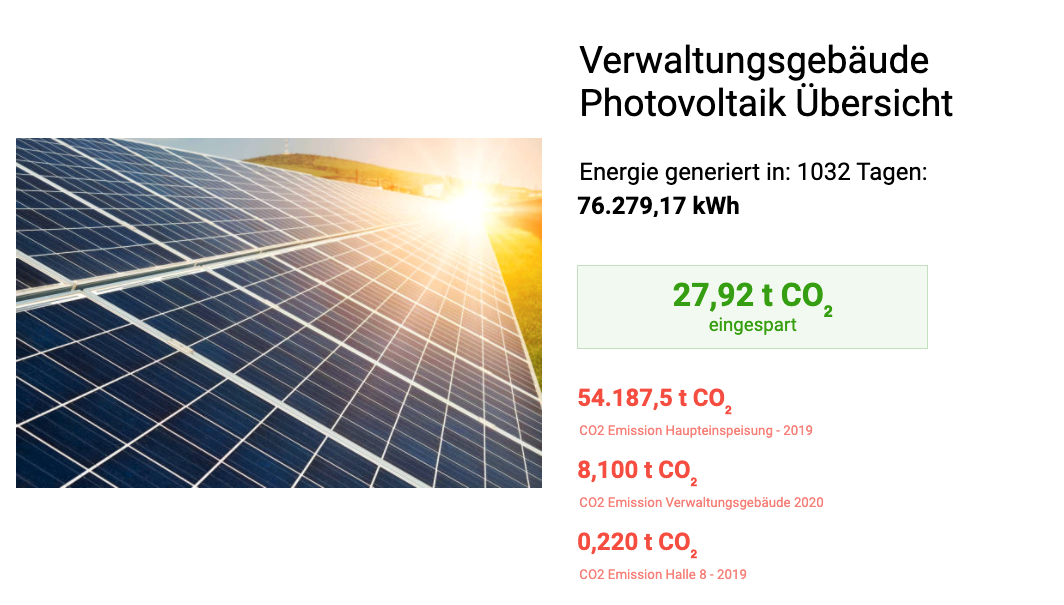
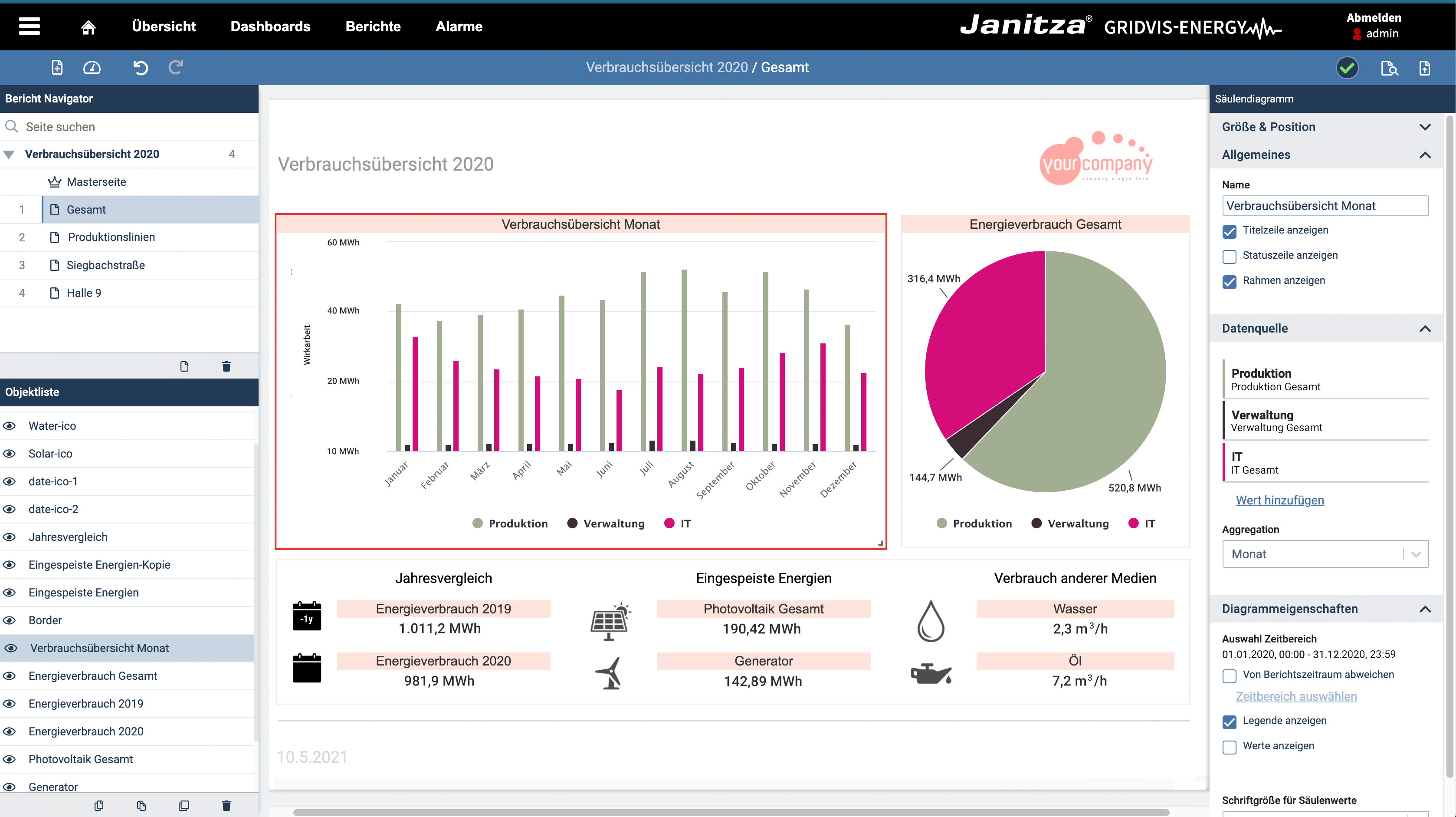
| CO2-Emission aufdecken und visualisieren (ab Version 8.0.100)Mit dem neuen CO2-Objekt im Berichtseditor kann die durch den Stromverbrauch entstandene CO2-Emission visualisiert werden. Es kann ein Emissionsfaktor hinterlegt werden, der mit dem ausgewählten Energiewert verrechnet wird und dann die Emission für den gewünschten Zeitraum visualisiert.
| Berichtseditor | Expert |
| Berichte wiederverwenden und sichern mit der Import- und Export-Funktion (ab Version 8.0.60)Ein erstellter Berichte kann mit der neuen Import- und Export-Funktion jetzt auch in anderen Projekten verwendet werden, ohne den Bericht erneut erstellen zu müssen. Neben der Wiederverwendbarkeit kann der Export auch verwendet werden, um ein Backup besonders wichtiger Berichte zu erstellen. Durch den neuen “Gerätetausch” innerhalb des Berichtseditors, kann ein Bericht auch in anderen GridVis-Projekten verwendet werden. | Berichte | Expert |
| Berichte automatisch erstellen und per E-Mail versenden (ab Version 8.0.60)Lassen Sie sich Ihre Tages-, Wochen- oder Monatsberichte automatisch zusenden. Mit der automatischen Berichtserstellung und der E-Mail-Benachrichtigung ist dies kein Problem. Sobald Sie einen Zeitplan für die automatische Erstellung ausgewählt haben, können Sie bis zu 10 E-Mail-Adressen konfigurieren, an die der Bericht nach Erstellung versandt werden soll. In den Berichtseinstellungen kann dies konfiguriert werden. | Berichte | Expert |
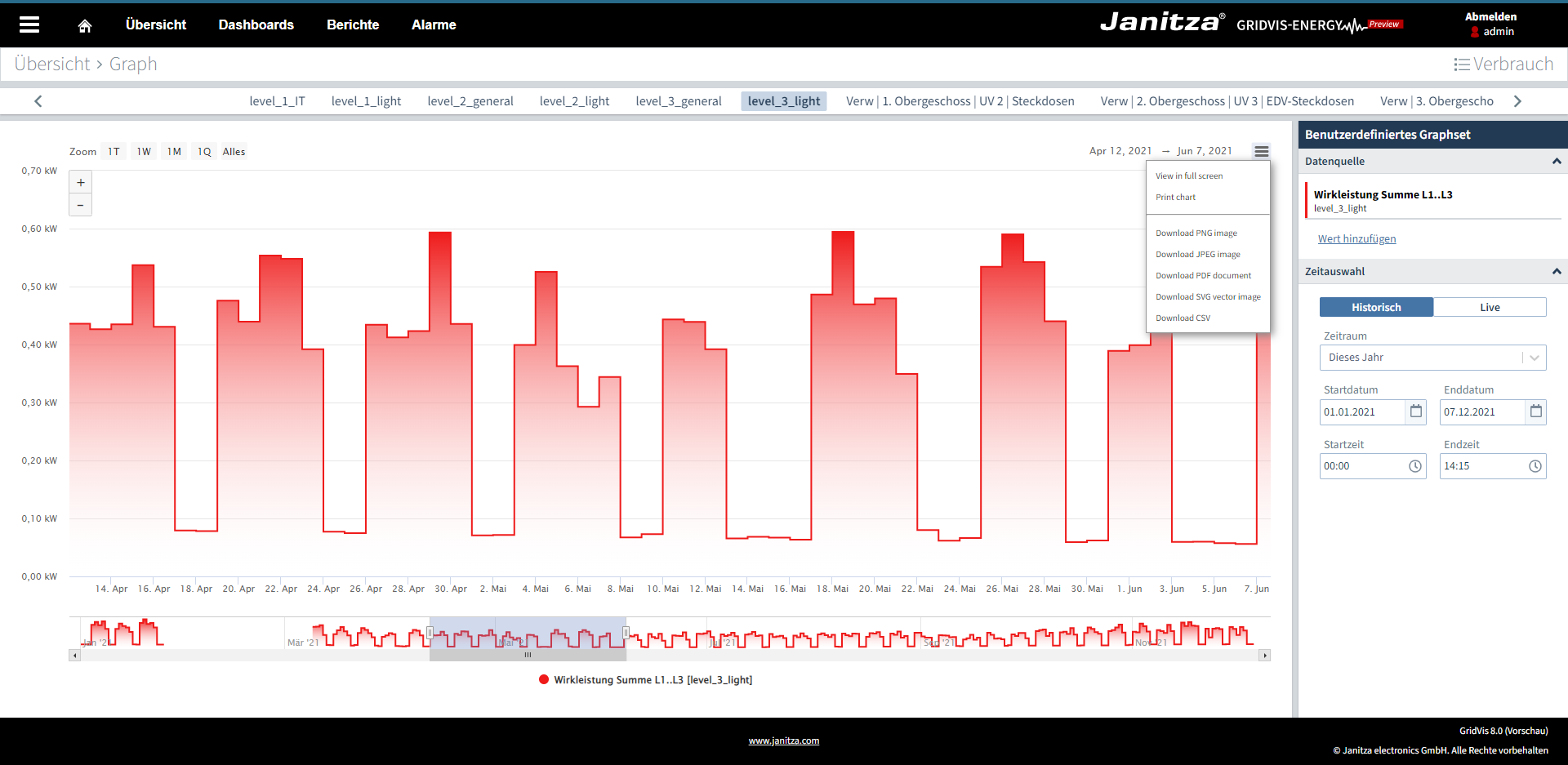
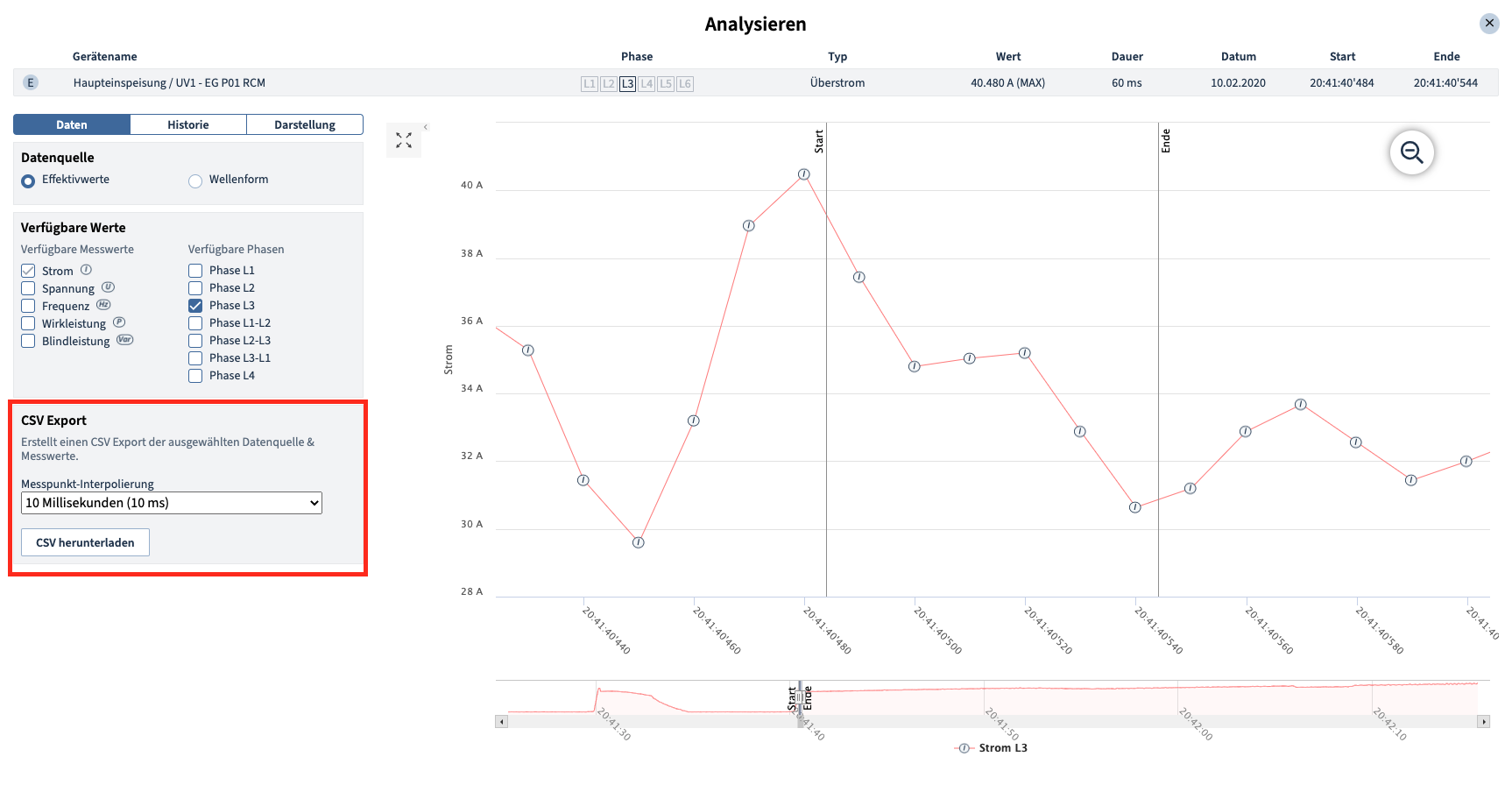
| Graphen drucken, als PDF erstellen oder als CSV bzw. Bilddatei exportieren (ab Version 8.0.40)Mit der neuen Messwertanalyse können erstellte Graphen direkt ausgedruckt oder als PDF abgespeichert werden. Zudem ist es möglich die Energie- und Messdaten in einer CSV-Datei abzulegen oder in einem Bild zu speichern.
| Graphen | Standard, Expert |
| Unternehmenslizenz (ab Version 8.0.60)Erworbene Lizenzen können mit anderen Benutzer innerhalb eines Unternehmen bzw. Organisation geteilt werden. Das bietet anderen Benutzern die Möglichkeit, Projekte selbst zu lizenzieren und auf die Lizenzen zugreifen zu können. Das Zugriffsrecht kann für jeden Benutzer eingeschränkt werden. Somit ist es möglich, Benutzern nur die Möglichkeit der Lizenzierung zu geben oder auch für administrative Rechte freizuschalten. | Lizenz | Essentials, Standard, Expert |
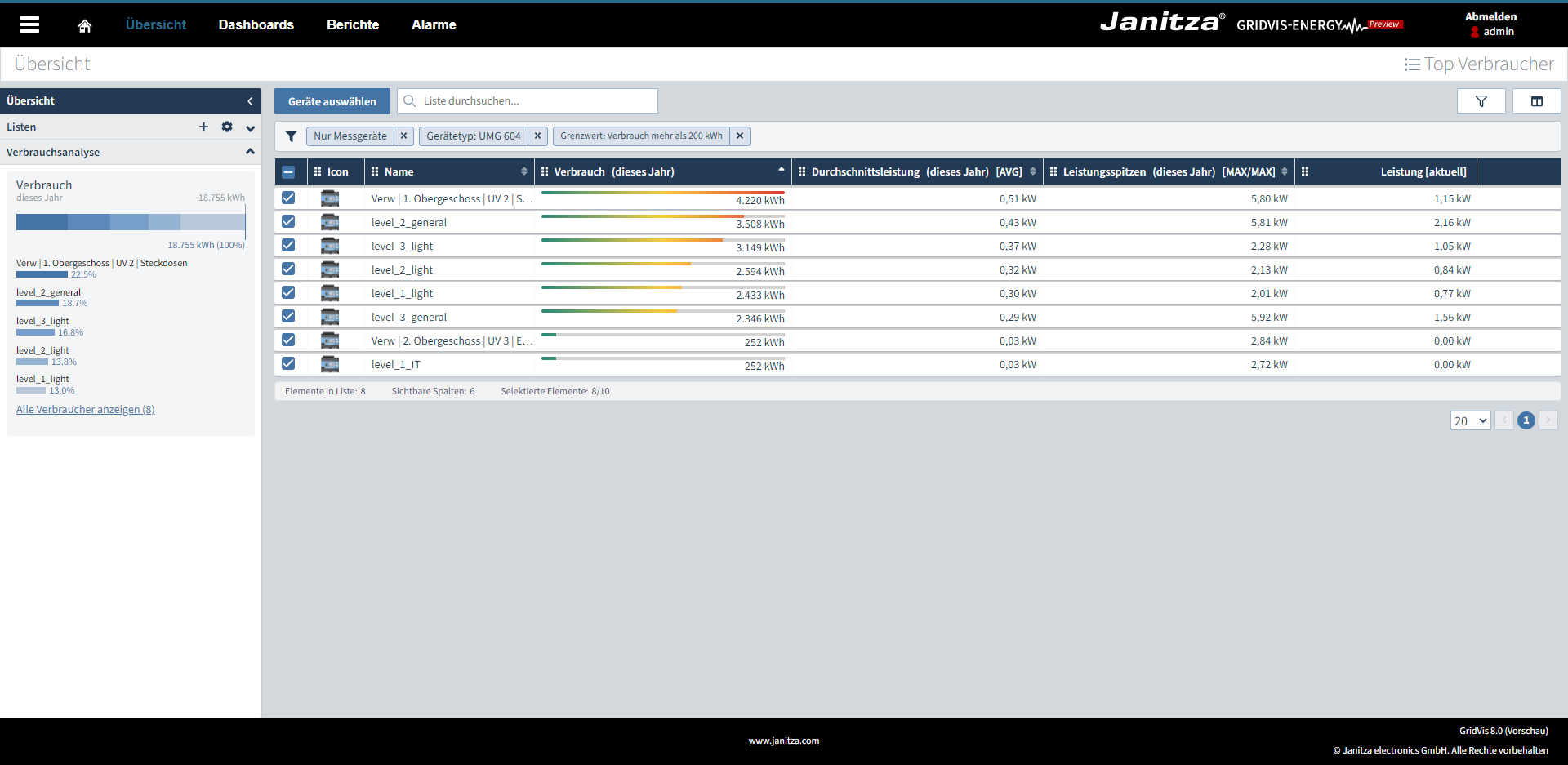
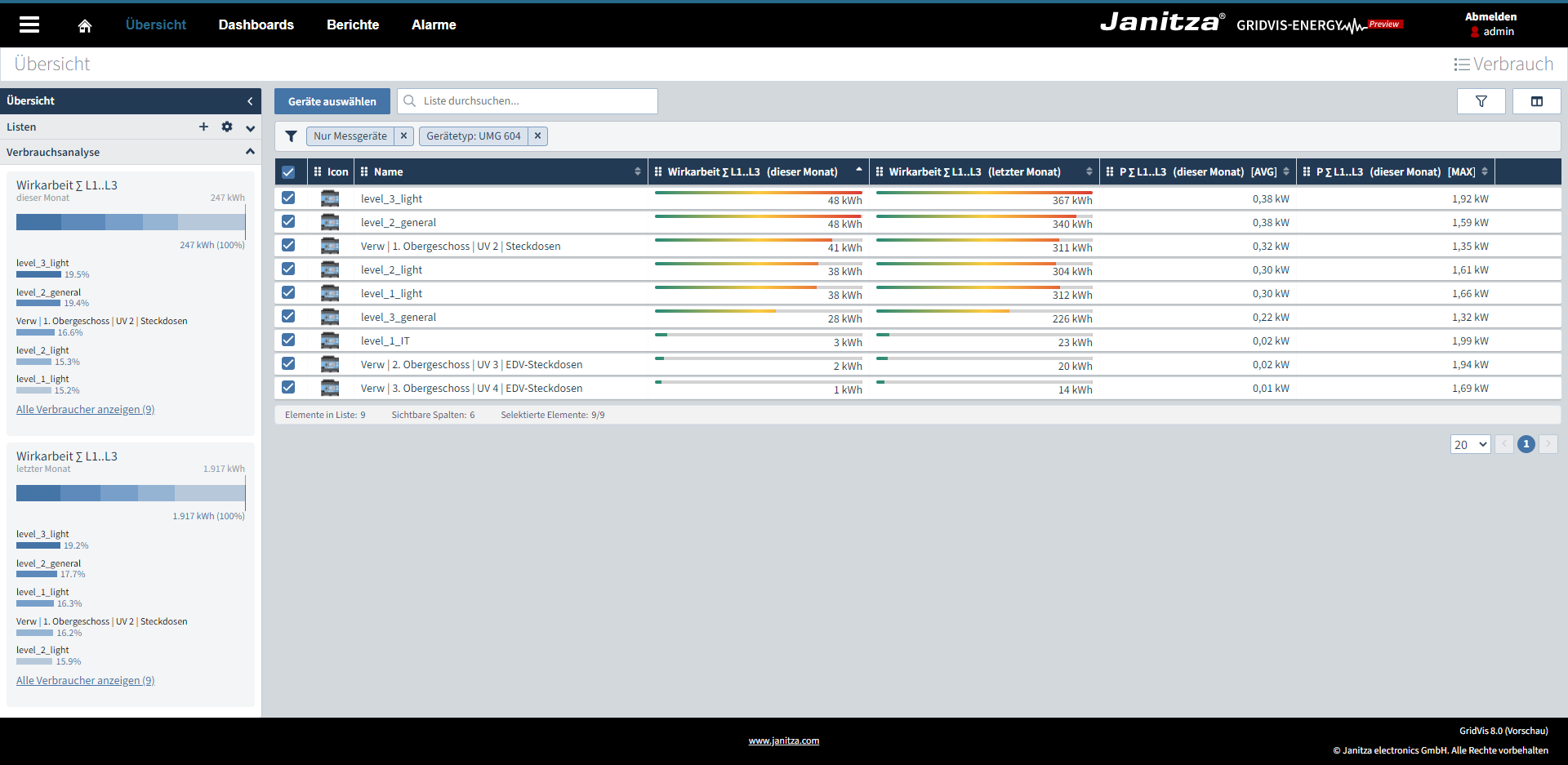
| Energie- und historische Messwerte auf einen Blick (ab Version 8.0.100)Historische Messwerte wie Spannung, Strom oder Wirkleistung sowie Energieverbräuche können ab sofort auch in Listen dargestellt werden. Die Erweiterung bietet die Möglichkeit, Messwerte zwischen verschiedenen Zeiträumen zu vergleichen und dies auch für eine große Anzahl von Messstellen. Die Spalten mit historischen Mess- und Energiewerten können nach Größe sortiert und sogar auf einen Grenzwert gefiltert werden. Mit der Filterfunktion können Listen so aufgebaut werden, dass diese z. B. nur die größten Verbraucher (SEUs) in einem Unternehmen darstellen. Für Verbrauchswerte steht optional ein Relationsbalken zur Verfügung. Die Balken zeigen die Relation der Verbräuche untereinander und bieten die Möglichkeit, große Verbräuche mit dem Auge schnell erfassen zu können. Mittelwerte, MIN, MAX und MAX-MAX Werte können berechnet und in den Spalten dargestellt werden. Energiewerte können als Verbrauch oder Zählerstand dargestellt werden.
| Geräteübersicht | Standard, Expert |
| Verbräuche summieren und analysieren (ab Version 8.0.100)Die Verbrauchsanalyse findet man in der Sidebar direkt in der Übersicht. Die Funktion stellt für jede Spalte mit einem Verbrauchswert eine Balkengrafik zur Verfügung. Die Grafik zeigt den Gesamtverbrauch an und kann zusätzlich für eine “Was wäre wenn”-Analyse verwendet werden. Mithilfe der Selektion Spalte können einzelne Messstellen aus dem Gesamtverbrauch direkt herausgerechnet und dargestellt werden. Einzelne Verbraucher werden in einer zusätzlichen Rankingliste dargestellt. Das Ranking zeigt die Topverbraucher und deren prozentualen Anteil an dem Gesamtverbrauch aller Messstellen an, die in einer Liste aufgeführt sind.
| Geräteübersicht | Expert |
Editor für Berichte: ThemingMit der Theming-Einstellung im Editor für Berichte konfigurieren Sie grafische Elemente ganz nach gewünschtem Firmen-CI. Dabei können z. B. Standardfarben, Hintergründe, Objekte, Kopfzeilen und Schriftfarben kundenspezifisch konfiguriert werden.
| Berichtseditor | Expert | |
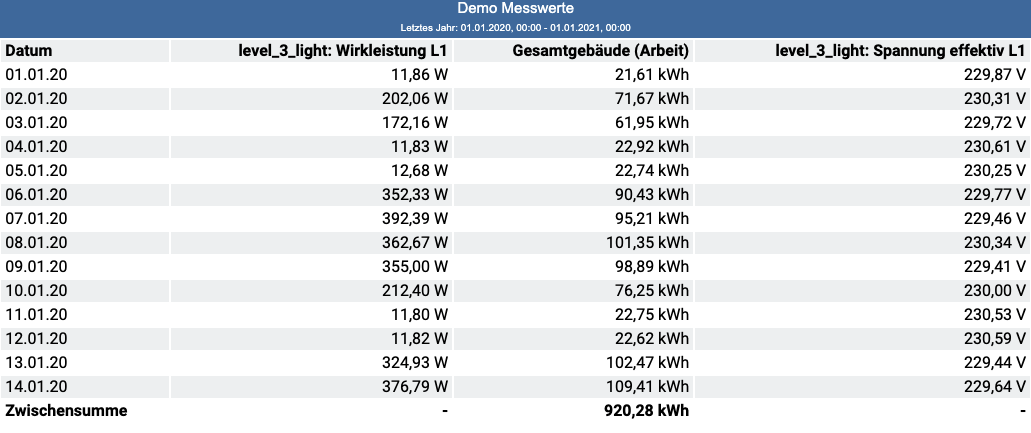
Editor für Berichte: Energie- & Messwerttabelle (neues Tabellen-Objekt)Das neue Tabellen-Objekt kann für Energie- und Messwerte verwendet werden. Mit dem neuen Objekt ist es möglich, eigene Tabellen zu gestalten und Verbräuche bzw. Mittelwerte, MIN.- oder MAX-Werte numerisch über einen Zeitraum darzustellen.
| Berichtseditor | Expert | |
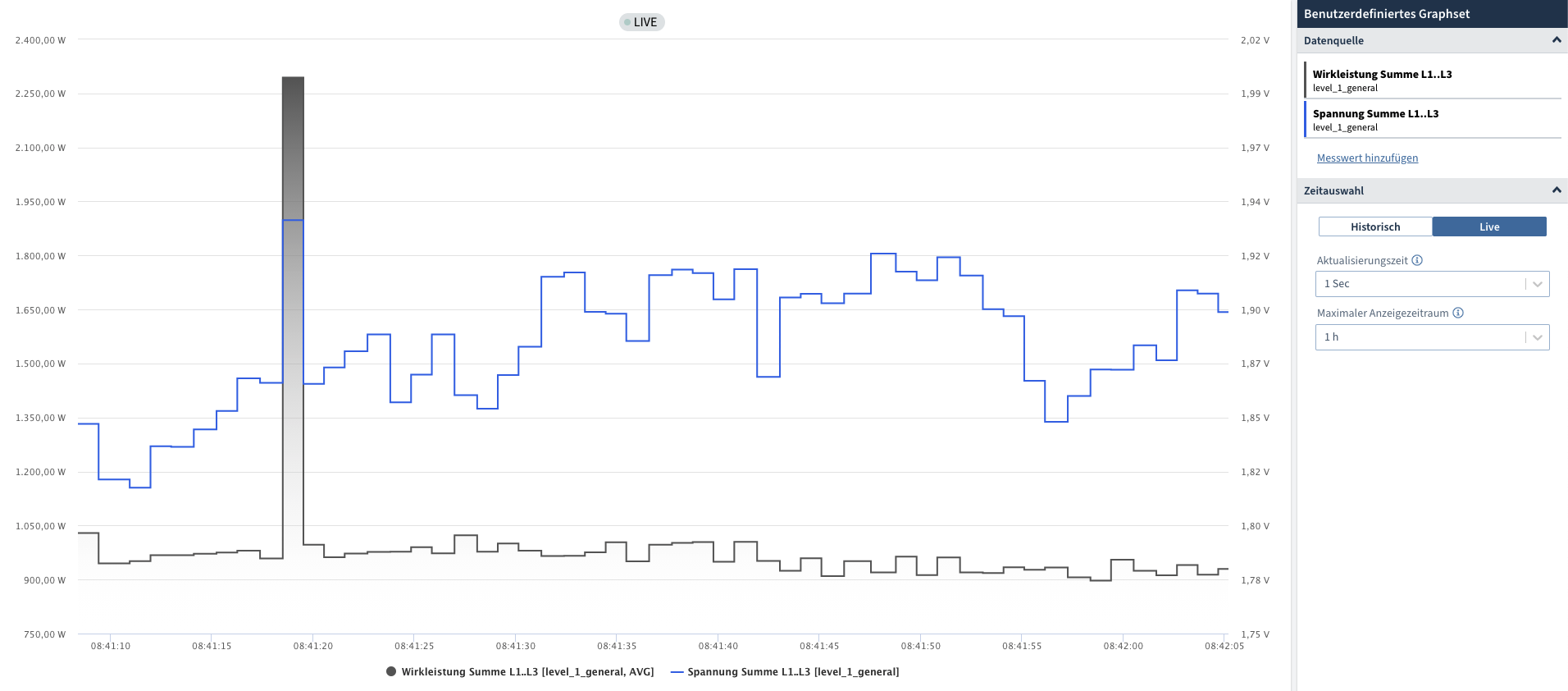
Messwertanalyse im WEB - Livewerte
| Livewerte | Standard, Expert | |
Eine Installationsdatei für die GridVis-Desktop und den Dienst (Service)
| Installation | Essential, Standard, Expert | |
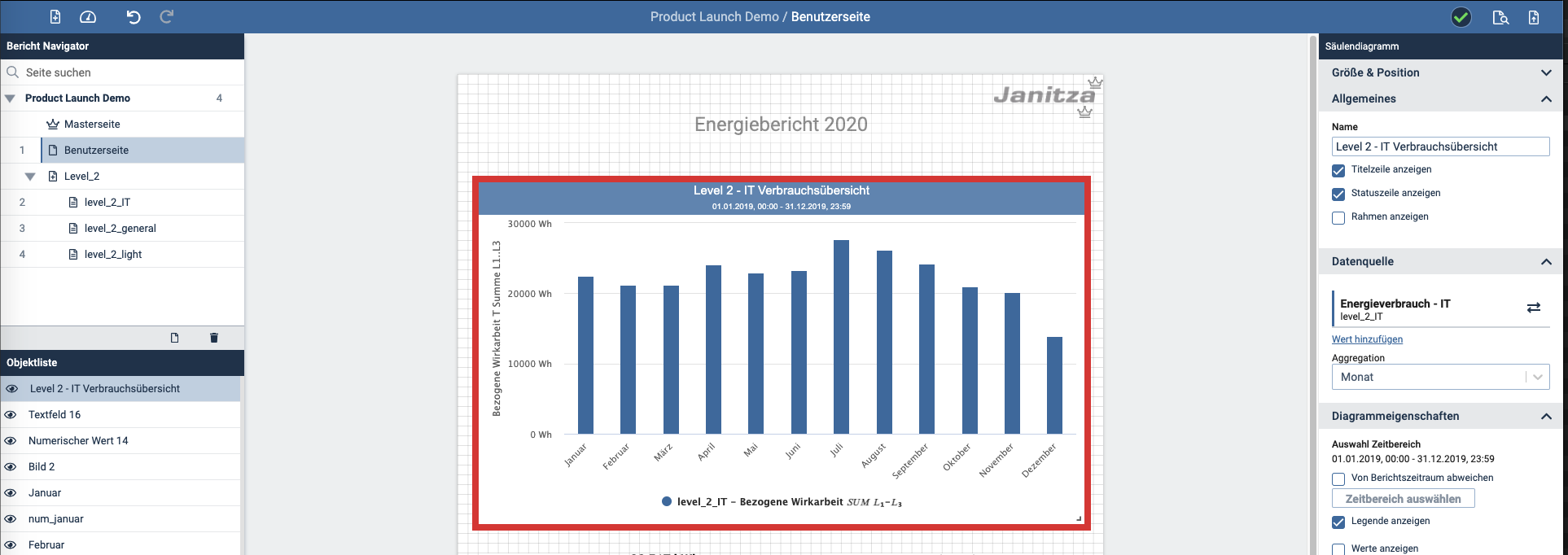
Editor für BerichteBerichte nach eigener Vorstellung erstellen
| Berichte | Expert | |
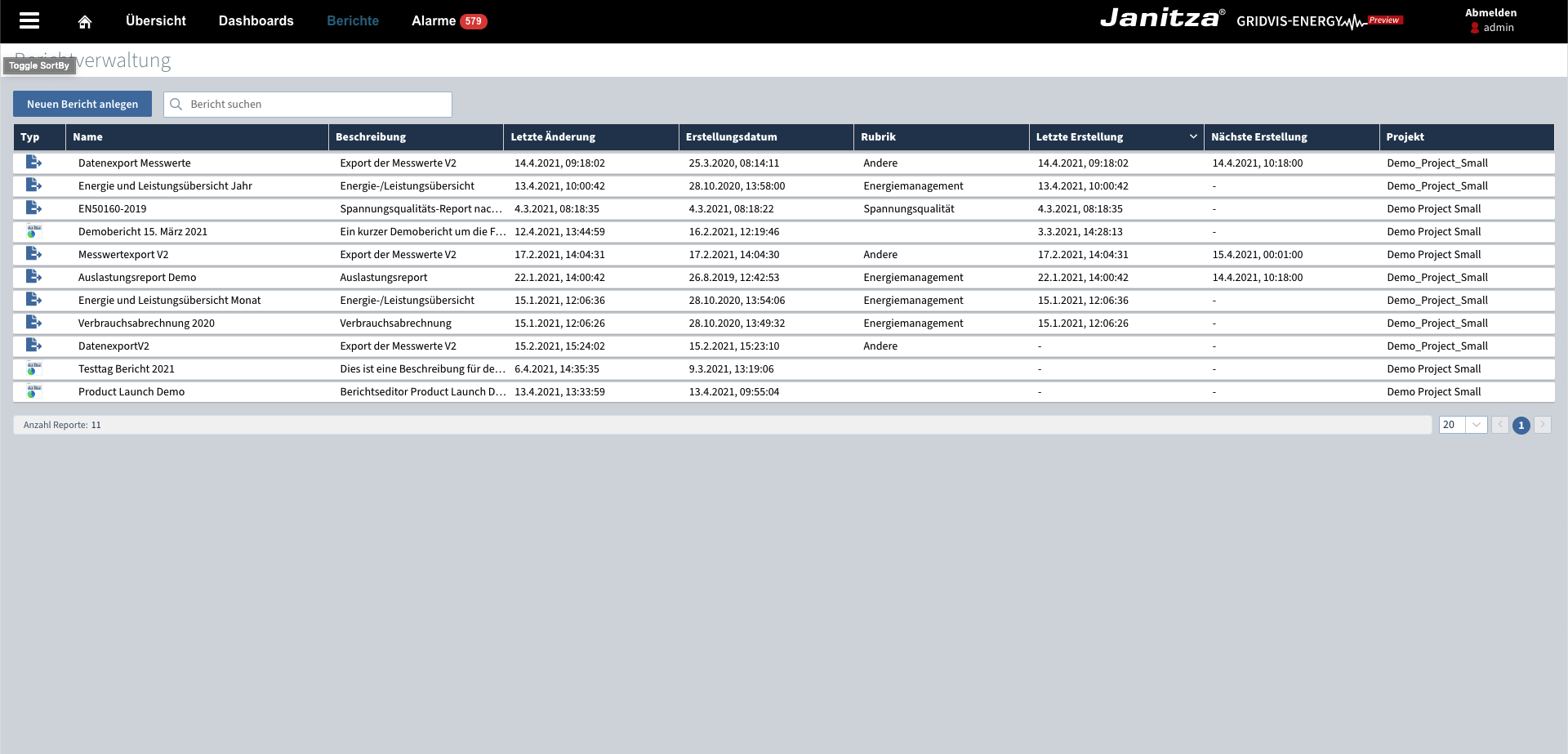
Datenexporte und Berichte im Web verwaltenDirekter Zugriff auf erstellte Berichte & Datenexporte (z. B. pdf) im WEB
| Berichte | Standard, Expert, Service, Ultimate | |
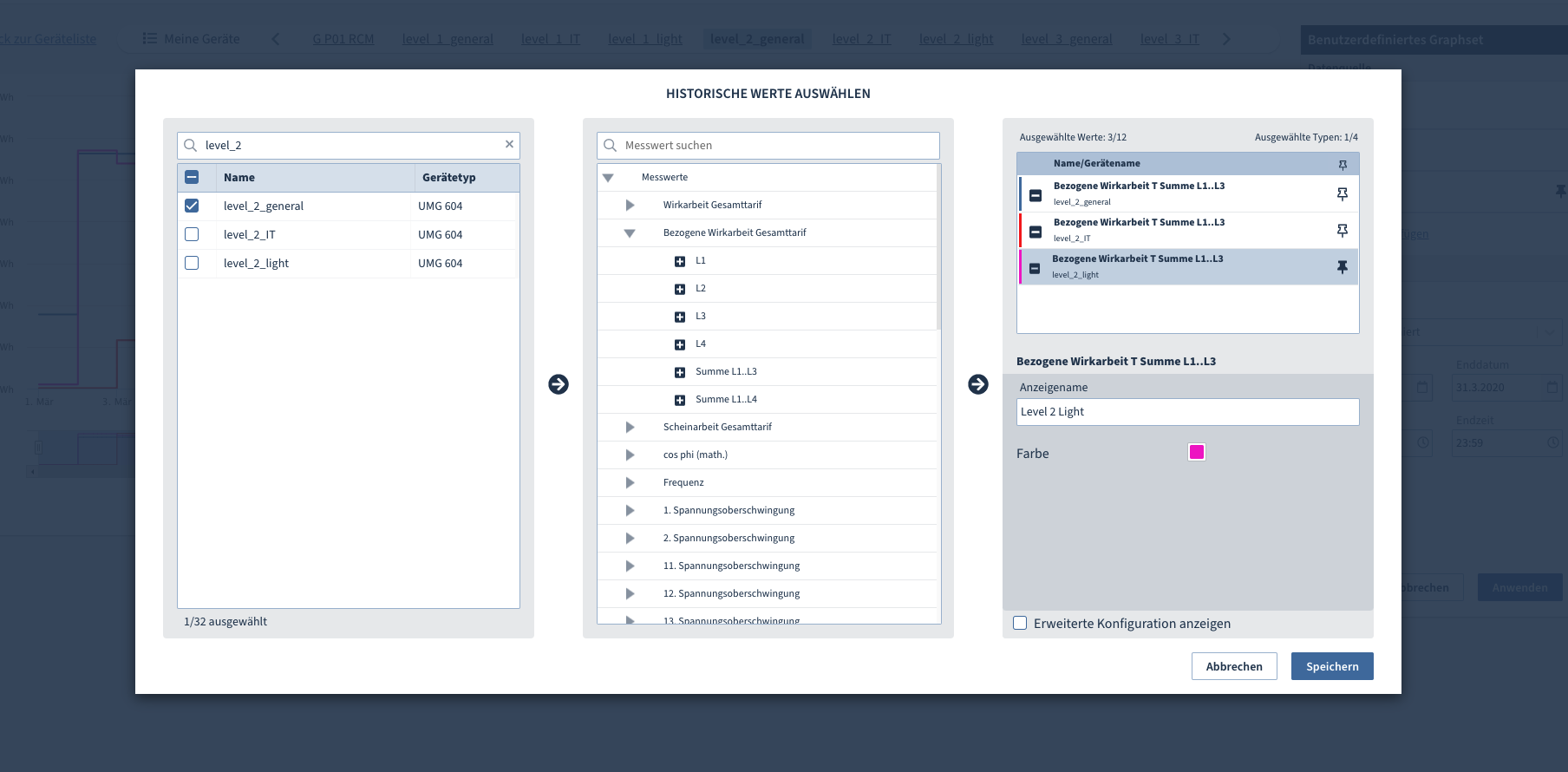
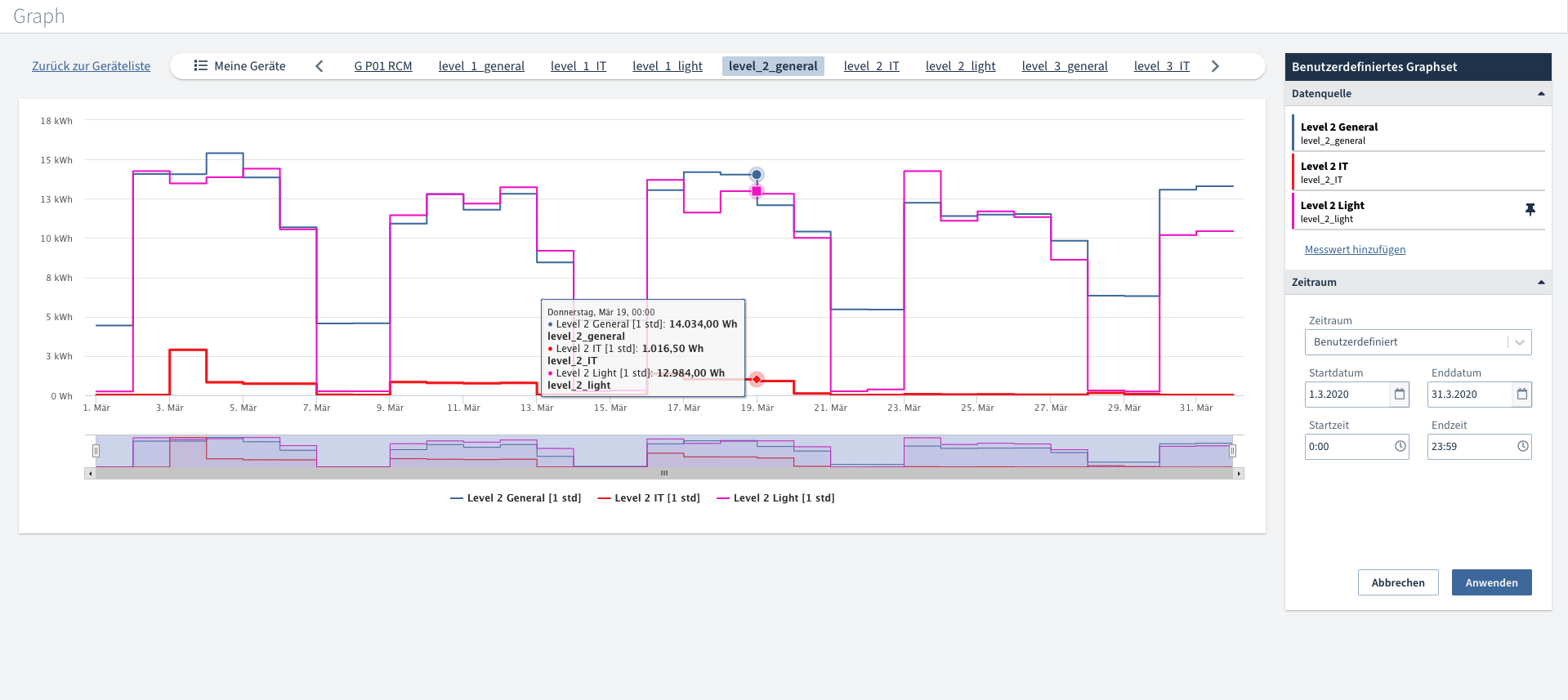
Erweiterungen in der neuen Graph-Funktion im "WEB"Nützliche Graph-Funktion für die schnelle Messwertanalyse
| Graphen | Standard, Expert, Service, Ultimate | |
Event Browser - CSV-ExportHochauflösende Messdaten direkt ins CSV Format exportieren!
| Datenexporte | Standard, Expert, Service, Ultimate |

Optimierungen und Fehlerkorrekturen (Changelog)
Hinweis
Nach einem Software-Update muss eine Datenbank-Migration durchgeführt werden (ab Version 8.0.101).
| Kurztext | Komponente | Betrifft | Version | |
|---|---|---|---|---|
| Sicherheitsupdate: Neue Version für logback (CVE-2021-42550) | System | GridVis-Desktop / GridVis-Web | 8.0.102 |
| Fehlerkorrektur Listenübersicht: sporadischer Fehler beim Laden | Geräteübersicht | GridVis-Web | 8.0.102 |
| Fehlerkorrektur Installer: Dienst wird beim Update nur mit installiert, wenn dieser vorher schon vorhanden war | Installer | GridVis-Desktop / GridVis-Web | 8.0.102 |
| Fehlerkorrektur Datenexport MSCONS: Sommerzeit wird berücksichtigt | Daten-Exporte/Reporte | GridVis-Desktop | 8.0.102 |
| Funktionsanpassung Geräteübersicht im WEB & Messwertanalyse: Das UMG 801 wird temporär nicht mehr unterstützt | Geräteübersicht | GridVis-Web | 8.0.101 |
| Fehlerkorrektur UMG801: Stabilisierung des Upgrade-Prozesses. | Geräte | GridVis-Desktop | 8.0.101 |
| Fehlerkorrektur Auslastungsreport: Der Auslastungsreport kann mit dem UMG 801 konfiguriert werden | Daten-Exporte/Reporte | GridVis-Desktop | 8.0.101 |
| Fehlerkorrektur Konfiguration eines UMG 96-PA-MID+ mit Modul über ein UMG 512 Master übertragen. | Geräte | GridVis-Desktop | 8.0.101 |
| Fehlerkorrektur UMG 96-PA-MID+ mit RCM-EL Modul lassen sich keine RCM Werte aufzeichnen. | Geräte | GridVis-Desktop | 8.0.101 |
| Fehlerkorrektur Datenexport Messwerte V2: Energiewerte ohne Rücklaufsperre werden richtig ausgegeben | Daten-Exporte/Reporte | GridVis-Desktop | 8.0.101 |
| Fehlerkorrektur Datenexport Messwerte V2: Der letzte Wert ist jetzt im Export verfügbar | Daten-Exporte/Reporte | GridVis-Desktop | 8.0.101 |
| Fehlerkorrektur Datenimport: Datumsformat Sekunden | Daten-Import | GridVis-Desktop / GridVis-Web | 8.0.101 |
| Funktionserweiterung Übersicht im WEB: Energiedaten können optional mit Relationsbalken dargestellt werden | Geräteübersicht | GridVis-Web | 8.0.101 |
| Funktionserweiterung Übersicht im WEB: Aktualisierungszeit für Mess- und Energiewerte kann eingestellt werden | Geräteübersicht | GridVis-Web | 8.0.101 |
| Fehlerkorrektur Messwertauswahl: benutzerdefinierte mit Definition Energiewert werden mit angezeigt | Messwertauswahl | GridVis-Web | 8.0.101 |
| Funktionsanpassung MSCONS Export: Version auf 2.3c angehoben | Daten-Exporte/Reporte | GridVis-Desktop | 8.0.101 |
| Funktionserweiterung Berichtseditor: Der Anwender wird durch einen Wizard durch die Berichtserstellung geführt | Berichtseditor | GridVis-Web | 8.0.101 |
| Funktionserweiterung Datenexport: Im Auslastungsreport kann die Gruppen & Gerätereihenfolge frei bestimmt werden | Daten-Exporte/Reporte | GridVis-Desktop | 8.0.101 |
| Funktionserweiterung Anschlussvariante 3P1W UMG 96-PA Serie & PQ-L Serie | Geräte | GridVis-Desktop / GridVis-Web | 8.0.101 |
| Fehlerkorrektur Datenexport: Es wurde ein Fehler in der Zeitauswahl behoben | Daten-Exporte/Reporte | GridVis-Desktop | 8.0.101 |
| Fehlerkorrektur UMG 96-PA und PQ-L Serie Anpassung Messwert Validierung des Vergleicher Schwellwertes | Geräte | GridVis-Desktop | 8.0.101 |
| Funktionserweiterung Berichtseditor: Wochenenden können im Säulendiagramm hervorgehoben werden | Berichtseditor | GridVis-Web | 8.0.101 |
| Funktionserweiterung Export der Messwerte v2: Skalierung kann gewählt werden | Daten-Exporte/Reporte | GridVis-Desktop | 8.0.101 |
| Funktionserweiterung Export der Messwerte v2: Exportierte Messwerte können auf 15 Minuten aggregiert werden | Daten-Exporte/Reporte | GridVis-Desktop | 8.0.101 |
| Funktionsoptimierung Datenbank: robustere Datenbankspeicherungen bei Geräteauslesung hergestellt | Datenbanken | GridVis-Desktop | 8.0.100 |
| Funktionsanpassung ID Server: Offline lizenzierte Projekte können wieder aus der Lizenz entfernt werden | ID-Server | GridVis-Desktop / GridVis-Web | 8.0.100 |
| Fehlerkorrektur UMG801: Stabilisierung des Upgrade-Prozesses. | Geräte | GridVis-Desktop | 8.0.100 |
| Funktionserweiterung ID Server: Lizenz teilen Email Benachrichtigung | ID-Server | GridVis-Desktop / GridVis-Web | 8.0.100 |
| Funktionserweiterung Übersicht im WEB: historische Mess- und Energiedaten können auf Grenzwerte gefiltert werden | Geräteübersicht | GridVis-Web | 8.0.100 |
| Funktionserweiterung API: Erweiterung der Energiewert API um die Ausgabe der Aufzeichnungsqualität | Berichtseditor | GridVis-Web | 8.0.100 |
| Funktionserweiterung Übersicht im WEB: historische Messwerte können als Spalte hinzugefügt werden | Geräteübersicht | GridVis-Web | 8.0.100 |
| Funktionserweiterung Übersicht im WEB: Aktualisierungszeit für Mess- und Energiewerte kann eingestellt werden | Geräteübersicht | GridVis-Web | 8.0.100 |
| Funktionserweiterung Übersicht im WEB: Verbrauchsanalyse Energie in der Sidebar | Geräteübersicht | GridVis-Web | 8.0.100 |
| Funktionserweiterung Berichtseditor: CO2 Emission im Bericht darstellen | Berichtseditor | GridVis-Web | 8.0.100 |
| Fehlerkorrektur UMG 96-PQ-L: MIN/MAX Werte werden nicht in der Aufzeichnungskonfiguration angezeigt | Geräteübersicht | GridVis-Web | 8.0.100 |
| Funktionserweiterung Berichtseditor: Die Farbauswahl wurde um die Transparenz erweitert | Berichtseditor | GridVis-Web | 8.0.100 |
| Funktionserweiterung Berichtseditor: Textausrichtung im Objekt "Numerischer Wert" kann verändert werden | Berichtseditor | GridVis-Web | 8.0.100 |
| Funktionserweiterung Berichtseditor: Wochenenden können im Liniendiagramm hervorgehoben werden | Berichtseditor | GridVis-Web | 8.0.100 |
| Fehlerkorrektur Berichtsverwaltung: Der Link zum aktuellsten Bericht konnte nicht kopiert werden | Berichtsverwaltung | GridVis-Web | 8.0.100 |
| Fehlerbehebung UMG801: Stabilisierung des Upgrade-Prozesses. | Geräte | GridVis-Desktop | 8.0.82 |
| Fehlerkorrektur Inbetriebnahme-Report: Fehler bei der Skalierung wurde behoben | Daten-Exporte/Reporte | GridVis-Desktop | 8.0.82 |
| Fehlerbehebung DI: Messwertgenauigkeit | Daten-Import | GridVis-Desktop / GridVis-Web | 8.0.81 |
| Fehlerkorrektur Installer: Deinstallieren stoppt den Dienst automatisch | Installer | GridVis-Desktop / GridVis-Web | 8.0.81 |
| Fehlerkorrektur Active Directory: Es wurde ein Problem das nach dem Neustart der GridVis auftrat behoben | Benutzerverwaltung | GridVis-Desktop | 8.0.81 |
| Fehlerkorrektur Datenimport: 1 & 5 Minutenwerte mit Endezeitpunkt | Daten-Import | GridVis-Desktop | 8.0.81 |
| Funktionserweiterung Übersicht im WEB: Energiedaten können als Spalte hinzugefügt werden | Geräteübersicht | GridVis-Web | 8.0.81 |
| Funktionserweiterung Dashboards: Dashboardgruppen können per Autoverfollständigung festgelegt werden | Dashboards | GridVis-Web | 8.0.81 |
| Funktionserweiterung Übersicht im WEB: Energiespalten können sortiert werden | Geräteübersicht | GridVis-Web | 8.0.81 |
| Funktionserweiterung Berichtseditor: erweitere Messwert Einstellungen im Liniendiagramm | Berichtseditor | GridVis-Web | 8.0.81 |
| Funktionserweiterung Übersicht im WEB: Nachkommastelle & Skalierung kann für Energie und -Messwerte eingestellt werden | Geräteübersicht | GridVis-Web | 8.0.81 |
| Funktionsanpassung Datenübertragung: TLS 1.0 wird nicht mehr unterstützt | Allgemeines | GridVis-Web / GridVis-Web | 8.0.81 |
| Funktionserweiterung Übersicht im WEB: historische Messwerte können als Spalte hinzugefügt werden | Geräteübersicht | GridVis-Web | 8.0.81 |
| Fehlerkorrektur: Datenexporte können im Web ausgeblendet werden | Berichtsverwaltung | GridVis-Web | 8.0.81 |
| Funktionserweiterung Geräte Konfiguration Web | Werkseinstellung für UMG 96-PQ-L, UMG 96-PA, UMG801 und UMG 806 | Konfiguration | GridVis-Web | 8.0.81 |
| Funktionserweiterung | UMG 96-PQ-L Wellenform als Onlinewert | Graphen | GridVis-Desktop | 8.0.81 |
| Funktionserweiterung Berichtseditor: Während des Gerätetauschs kann die Aufzeichnungsdichte automatisch angepasst werden | Berichtseditor | GridVis-Web | 8.0.81 |
| Funktionserweiterung Berichtseditor: Objekte können aneinander ausgerichtet werden | Berichtseditor | GridVis-Web | 8.0.81 |
| Fehlerkorrektur UMG801: Verbesserte Performance beim Auslesen von historischen Daten. | Geräte | GridVis-Desktop / GridVis-Web | 8.0.80 |
| Funktionsanpassung ID Server: Email Adresse kann geändert werden | ID-Server | GridVis-Desktop / GridVis-Web | 8.0.80 |
| Funktionserweiterung Übersicht im WEB: Sidebar wurde mit Tab-Funktion erweitert | Geräteübersicht | GridVis-Web | 8.0.80 |
| Funktionserweiterung | UMG 96-PQ-L Unterstützung Partition A & B | Geräte | GridVis-Desktop / GridVis-Web | 8.0.80 |
| Funktionserweiterung | UMG 96-PQ-L Ereignisse | Geräte | GridVis-Desktop / GridVis-Web | 8.0.80 |
| Funktionserweiterung | UMG 96-PA-MID+ Zusätzlicher Messwert Kalibrations-Intervall | Geräte | GridVis-Desktop | 8.0.80 |
| Funktionserweiterung Berichtseditor: Mehrfachselektion & -konfiguration von Objekten | Berichtseditor | GridVis-Web | 8.0.80 |
| Funktionserweiterung Berichtseditor: Neues Objekt - Regressionsanalyse | Berichtseditor | GridVis-Web | 8.0.80 |
| Fehlerbehebung DI: Messwertgenauigkeit | Daten-Import | GridVis-Desktop / GridVis-Web | 8.0.70 |
| Fehlerkorrektur Projektname: Umlaute im Projektnamen können zu Fehler in der Anwendung führen | Projekt | GridVis-Desktop / GridVis-Web | 8.0.70 |
| Fehlerkorrektur Installer: Deinstallieren stoppt den Dienst automatisch | Installer | GridVis-Desktop / GridVis-Web | 8.0.69 |
| Fehlerkorrektur Windows Authentifizierung MSSQL Treiber | Datenbanken | GridVis-Desktop | 8.0.67 |
| Fehlerkorrektur Geräteübersicht im WEB: türkische Sprache wird nicht dargestellt | Geräteübersicht | GridVis-Desktop | 8.0.63 |
| Fehlerkorrektur UMG801: Auslesen der PQ-Daten | Geräte | GridVis-Desktop / GridVis-Web | 8.0.62 |
| Fehlerkorrektur KPI: PDF Export funktioniert wieder | KPI | GridVis-Web | 8.0.62 |
| Funktionserweiterung Gerätekonfiguration im Web; Hinweis beim Verlassen der Seite zum speichern | Konfiguration | GridVis-Web | 8.0.62 |
| Funktionserweiterung Geräteübersicht im WEB: Sidebar klappbar mit Tab Funktion | Geräteübersicht | GridVis-Web | 8.0.62 |
| Funktionserweiterung Berichtseditor: E-Mail Benachrichtigung bei Berichterstellung | Berichtseditor | GridVis-Web | 8.0.62 |
| Funktionsanpassung Error Report: automatischer Versand wird nicht mehr unterstützt | Abkündigung | GridVis-Desktop | 8.0.62 |
| Funktionserweiterung Web Gerätekonfiguration in GridVis Desktop für PA und PQ-L Serie | Geräte | GridVis-Desktop | 8.0.62 |
| Fehlerkorrektur: Nicht gefundene Geräte können jetzt in Benutzerdefinierten Bäumen gelöscht werden | Geräte | GridVis-Desktop | 8.0.62 |
| Funktionserweiterung Auslastungsreport: Der Neutralleiter kann mit einem neuen Grenzwert überwacht werden | Daten-Export/Reporte | GridVis-Desktop | 8.0.61 |
| Funktionserweiterung Berichtseditor: erweitere Messwert Einstellungen im Säulendiagramm | Berichtseditor | GridVis-Web | 8.0.61 |
| Funktionserweiterung Berichtseditor: erweitere Messwert Einstellungen im Kreisdiagramm | Berichtseditor | GridVis-Web | 8.0.61 |
| Fehlerkorrektur & Verbesserung Speichern von Modbus Templates | Generischer Modbus | GridVis-Desktop | 8.0.61 |
| Funktionserweiterung Firmware Update RCM201-Rogo | Geräte | GridVis-Desktop | 8.0.60 |
| Fehlerkorrektur Auslastungsreport: Fehler bei der Berechnung der Summen | Daten-Export/Reporte | GridVis-Desktop | 8.0.60 |
| Funktionserweiterung Berichtsverwaltung: Optimierung des Fensters zur Berichtsübersicht | Berichtsverwaltung | GridVis-Web | 8.0.60 |
| Funktionserweiterung Janitza ID: Lizenzen können innerhalb eines Unternehmens geteilt werden | Lizenz | GridVis-Desktop / GridVis-Web | 8.0.60 |
| Funktionserweiterung Berichtseditor: Berichte können Projektübergreifend importiert und exportiert werden | Berichtseditor | GridVis-Web | 8.0.60 |
| Fehlerkorrektur & Verbesserung Parallele Updaten von Geräten | Geräte | GridVis-Desktop | 8.0.60 |
| Funktionserweiterung Berichtseditor: Neues Objekt - ABC Analyse | Berichtseditor | GridVis-Web | 8.0.60 |
| Funktionserweiterung Berichtseditor: Der numerische Wert zeigt den vorhandenen Datenanteil an | Berichtseditor | GridVis-Web | 8.0.60 |
| Funktionserweiterung Schleppzeiger in Web Gerätekonfiguration | Geräte | GridVis-Web | 8.0.60 |
| Funktionserweiterung Berichtseditor: Berichte können zwischen Projekten importiert und exportiert werden | Berichtseditor | GridVis-Web | 8.0.60 |
| Funktionserweiterung UMG801: Konfiguration Aufzeichnung Wellenform | Geräte | GridVis-Desktop | 8.0.60 |
| Fehlerkorrektur Gerätetausch | Geräte | GridVis-Desktop | 8.0.45 |
| Fehlerkorrektur UMG 801: Duplizierte Module und Messgruppen korrigiert | Geräte | GridVis-Desktop | 8.0.45 |
| Fehlerkorrektur UMG 801: Aufzeichnungslücken korrigiert | Geräte | GridVis-Desktop | 8.0.45 |
| Funktionserweiterung Installer: Ein Installer für die GridVis-Desktop und den GridVis-Dienst | Installer | GridVis-Desktop / GridVis-Web | 8.0.45 |
| Funktionserweiterung Graph im Web: Live-Werte | Graphen | GridVis-Web | 8.0.45 |
| Funktionserweiterung: Windows-Zertifikate werden unterstützt | System | GridVis-Desktop / GridVis-Web | 8.0.45 |
| Fehlerkorrektur UMG 96-PA-MID+: Öffnen der Gerätekonfiguration korrigiert | Geräte | GridVis-Desktop | 8.0.45 |
| Funktionserweiterung Gerätekonfiguration im Web: Speichern-Hinweis beim Verlassen der Seite | Geräte | GridVis-Web | 8.0.40 |
| Funktionserweiterung Graph im Web: Druckfunktion | Graphen | GridVis-Web | 8.0.40 |
| Funktionserweiterung Graph im Web: Darstellung von Absolut-Messwerten | Graphen | GridVis-Web | 8.0.40 |
| Funktionserweiterung UMG 96-PA: Werte setzen | Geräte | GridVis-Desktop | 8.0.40 |
| Funktionserweiterung Dashboards: Dashboard-Gruppen per Autovervollständigung festlegen | Dashboards | GridVis-Web | 8.0.40 |
| Funktionserweiterung CSV-Datenimport: Kopieren von Datenimporte in der GridVis | Daten-Export/Reporte | GridVis-Desktop | 8.0.40 |
| Funktionserweiterung REST API: Abfrage der Geräte-Firmware | Geräte | GridVis-Desktop | 8.0.40 |
| Funktionsanpassung Lizenz Server: E-Mail-Benachrichtigung bei neuen Editionen | Lizenz Server | GridVis-Desktop / GridVis-Web | 8.0.40 |
| Funktionserweiterung Installer: Neuer GridVis-Multi-Installer | Installer | GridVis-Desktop / GridVis-Web | 8.0.40 |
| Funktionserweiterung Graph im Web: Anpassen von Liniendicke und Füllfarbe | Graphen | GridVis-Web | 8.0.40 |
| Funktionserweiterung Graph im Web: Darstellung von Absolut-Messwerten | Graphen | GridVis-Web | 8.0.40 |
| Funktionserweiterung Graph im Web: PDF-Ausgabe | Graphen | GridVis-Web | 8.0.40 |
| Funktionserweiterung Berichtseditor: Neues Objekt - Energiewerte- und Messwerttabelle | Berichtseditor | GridVis-Web | 8.0.40 |
| Funktionserweiterung Berichtseditor: Objekterweiterung - dynamische Texte | Berichtseditor | GridVis-Web | 8.0.40 |
| Funktionserweiterung Graph im Web: PNG-, JPEG-, und SVG-Export | Graphen | GridVis-Web | 8.0.40 |
| Funktionserweiterung Graph im Web: PDF-Ausgabe | Graphen | GridVis-Web | 8.0.40 |
| Funktionserweiterung Graph im Web: Verbesserte Zeitraum-Auswahl und -Anzeige | Graphen | GridVis-Web | 8.0.40 |
| Funktionserweiterung Graph im Web: CSV-Export | Graphen | GridVis-Web | 8.0.40 |
| Fehlerkorrektur Auslastungsreport: Reporte-Abschluss unter bestimmter Konfiguration korrigiert | Daten-Export/Reporte | GridVis-Desktop | 8.0.22 |
| Fehlerkorrektur Janitza-ID: Sporadische Probleme beim Login korrigiert | ID-Server | GridVis-Desktop / GridVis-Web | 8.0.21 |
| Fehlerkorrektur und Verbesserung: Skalierung des generischen Modbus-Profils | Generischer Modbus | GridVis-Desktop | 8.0.21 |
| Fehlerkorrektur Datenexporte: Editieren und löschen korrigiert | Daten-Export/Reporte | GridVis-Desktop | 8.0.21 |
| Fehlerkorrektur: Bearbeitung der Zeitplanung einer Datenbankaktion bei aktivem Active Directory korrigiert | Datenbanken | GridVis-Desktop | 8.0.21 |
| Fehlerkorrektur RCM-Datenexport: Doppelte Geräteanzeige bei bestimmten Konfigurationen korrigiert | Daten-Export/Reporte | GridVis-Desktop | 8.0.21 |
| Funktionserweiterung Berichtseditor: Berichte anhand von Zeitplänen ausführen | Berichtseditor | GridVis-Web | 8.0.21 |
| Funktionserweiterung Berichtseditor: Neues Objekt - Rahmen & Linien | Berichtseditor | GridVis-Web | 8.0.21 |
| Funktionserweiterung Berichtseditor: Theming - Kundenspezifische Anpassung der grafischen Elemente des Berichtseditors (CI) | Berichtseditor | GridVis-Web | 8.0.21 |
| Funktionserweiterung Berichtsverwaltung: Link zum aktuellsten Bericht und Datenexport abrufbar | Daten-Export/Reporte | GridVis-Desktop | 8.0.21 |
| Funktionserweiterung Datenexport: Spannungsqualitäts-Report nach EN50160:2020 | Daten-Export/Reporte | GridVis-Desktop | 8.0.21 |
| Funktionsanpassung Gerätekonfiguration: Pre- und Post-Trigger-Zeiten in der Ereignis-Konfiguration angepasst (Sekundenanzeige) | Geräte | GridVis-Desktop | 8.0.21 |
| Fehlerkorrektur RCM-Report: RCM-Variablen generisches Modbus-Gerät & RCM202/201 korrigiert | Daten-Export/Reporte | GridVis-Desktop | 8.0.20 |
| UI-Änderung: Umbenennung "Benutzerdefinierte Trigger" in "Ereignis-Trigger" | Konfiguration | GridVis-Desktop | 8.0.20 |
| Funktionserweiterung UMG 801: Benutzerdefinierte Aufzeichnungskonfiguration | Geräte | GridVis-Desktop | 8.0.20 |
| Funktionserweiterung UMG 96-PA / PQ-L: Aufzeichnungskonfiguration in der Weboberfläche | Geräte | GridVis-Web | 8.0.20 |
| Funktionserweiterung Berichtseditor: Tastenkürzel erweitert | Berichtseditor | GridVis-Web | 8.0.20 |
| Funktionserweiterung UMG 512: Darstellung der LL-Transienten im Graphen korrigiert | Geräte | GridVis-Desktop | 8.0.20 |
| Fehlerkorrektur UMG 96 PA-MID+: Energieberechnung MID+ korrigiert | Geräte | GridVis-Desktop | 8.0.5 |
| Fehlerkorrektur Datenbankaktionen: Planen von DB-Aktionen korrigiert | Datenbank | GridVis-Desktop / GridVis-Web | 8.0.4 |
| Fehlerkorrektur UMG 96-PA-MID+: Status bei MID+-Messwerten korrigiert | Geräte | GridVis-Desktop | 8.0.4 |
| Fehlerkorrektur Lizenzierung: Proxyserver mit Login korrigiert | Lizenz | GridVis-Desktop / GridVis-Web | 8.0.4 |
| Fehlerkorrektur Lizenzierung: Inaktive Auslesung korrigiert | Lizenz | GridVis-Desktop / GridVis-Web | 8.0.4 |
| Fehlerkorrektur Topologie: Kann sporadisch deaktiviert sein | Topologie | GridVis-Desktop | 8.0.4 |
| Fehlerkorrektur Zeitstempel: ZSG-Report | Daten-Export/Reporte | GridVis-Desktop | 8.0.4 |
| Funktionserweiterung Graph im Web: Energie- und Messwerte können auf feste Zeiträume aggregiert werden | Graphen | GridVis-Web | 8.0.4 |
| Funktionserweiterung UMG 512: Neue Checkbox für die Ereignis-Trigger in der Konfiguration des UMG 512 "Aufzeichnung aller Ereignisse im COMTRADE-Format" | Geräte | GridVis-Desktop | 8.0.4 |
| Funktionserweiterung Graph im Web: Optimierter Tooltip & Legende | Graphen | GridVis-Web | 8.0.4 |
| Funktionserweiterung Graph im Web: Modus "Automatisch" für die Aufzeichnungsdichte | Graphen | GridVis-Web | 8.0.4 |
| Funktionserweiterung Geräteübersicht im WEB: Firmware und MAC-Adresse können als Spalte hinzugefügt werden | Geräteübersicht | GridVis-Web | 8.0.4 |
| Funktionserweiterung Graph im Web: Einstellung der Skalierung | Graphen | GridVis-Web | 8.0.4 |
| Fehlerkorrektur Lizenzportal: Janitza-ID Login korrigiert | Lizenz | GridVis-Desktop / GridVis-Web | 8.0.3 |
| Fehlerkorrektur deaktivierte Topologien | Topologie | GridVis-Desktop | 8.0.3 |
| Fehlerkorrektur Lizenzierung: Proxyserver mit Login korrigiert | Lizenz | GridVis-Desktop / GridVis-Web | 8.0.3 |
| Fehlerkorrektur Zeitstempel: ZSG-Report | Daten-Export/Reporte | GridVis-Desktop | 8.0.3 |
| Fehlerkorrektur Lizenzierung: Inaktive Auslesung korrigiert | Lizenz | GridVis-Desktop / GridVis-Web | 8.0.3 |
| Fehlerkorrektur UMG 96-PA-MID+: Status bei MID+-Messwerten korrigiert | Geräte | GridVis-Desktop | 8.0.3 |
| Funktionserweiterung Graph im Web: Messwerte-Aggregation für feste Zeiträume | Graphen | GridVis-Web | 8.0.3 |
| Funktionserweiterung Graph im Web: Tool-Tipp und Legende | Graphen | GridVis-Web | 8.0.3 |
| Funktionserweiterung Graph im Web: Automatische Aufzeichnungsdichte | Graphen | GridVis-Web | 8.0.3 |
| Funktionserweiterung Geräteübersicht im Web: Erweiterung um die Spalten Firmware und MAC-Adresse | Geräte | GridVis-Web | 8.0.3 |
| Funktionserweiterung Graph im Web: Neue Einstellung "Skalierung" | Graphen | GridVis-Web | 8.0.3 |
| Fehlerkorrektur Bildverwaltung | Dashboard/Bildverwaltung | GridVis-Web | 8.0.2 |
| Fehlerkorrektur Login Weboberfläche: Korrekturen bei Dienst Neustart | GridVis-Dienst | GridVis-Web | 8.0.2 |
| Fehlerkorrektur Auslastungsreport | Daten-Export/Reporte | GridVis-Desktop | 8.0.2 |
| Fehlerkorrektur letzte Auslesung in der Geräteliste | Geräte | GridVis-Desktop | 8.0.2 |
| Funktionserweiterung Graph im Web: Zeichenmethoden-Einstellung | Graphen | GridVis-Web | 8.0.2 |
| Funktionserweiterung UMG 96-PA-MID+ ab FW >3.0: Zusätzliche Messwerte-Auswahl | Geräte | GridVis-Desktop | 8.0.2 |
| Funktionserweiterung Graph im Web: Wertetypen-Auswahl MIN, MAX, SVG | Graphen | GridVis-Web | 8.0.2 |
| Funktionsänderung UMG 96-PA/UMG 96-PQ-L: Keine Unterstützung der Einstellung "Baudrate automatisch" im Modbus-Gateway-Betrieb | Geräte | GridVis-Desktop | 8.0.2 |
| Fehlerkorrektur Generische Modbus-Profile | Generischer Modbus | GridVis-Desktop | 8.0.1 |
| Fehlerkorrektur Lizenzierung: Google Login | Lizenz | GridVis-Desktop / GridVis-Web | 8.0.1 |
| Funktionserweiterung Graph im Web: Pinnfunktion von Messgeräten | Graphen | GridVis-Web | 8.0.1 |
| Funktionserweiterung Graph im Web: Mehrfachauswahl von Messgeräten | Graphen | GridVis-Web | 8.0.1 |
| Funktionserweiterung Graph im Web: Nachkommastellen-Einstellung | Graphen | GridVis-Web | 8.0.1 |
| Fehlerkorrektur UMG 801: Gerätenamen bei Alarmen und E-Mails korrigiert | Geräte | GridVis-Desktop | 8.0.1 |
| Fehlerkorrektur Login Weboberfläche: Korrekturen bei Dienst Neustart | GridVis-Dienst | GridVis-Web | 8.0.0 |
| Fehlerkorrektur UMG 801: Events und Transienten Download korrigiert | Ereignisse und Transienten | GridVis-Desktop | 8.0.0 |
| Fehlerkorrektur CSV-Datenimport: Energieberechnung der Minutenwerte korrigiert | Daten-Import | GridVis-Desktop | 8.0.0 |
| Fehlerkorrektur CSV-Datenimport: Hohe CPU-Auslastung bei kleinen Zeiteinheiten korrigiert | Daten-Import | GridVis-Desktop | 8.0.0 |
| Fehlerkorrektur UMG801: Bei deaktiviertem Grundgerät doppelt angelegte Module korrigiert | Geräte | GridVis-Desktop | 8.0.0 |
| Fehlerkorrektur Lizenzierung: Google Login | Lizenz | GridVis-Desktop / GridVis-Web | 8.0.0 |
| Funktionsänderung Online Recorder: Ab Edition Standard verfügbar | Online Recorder | GridVis-Web | 8.0.0 |
| Funktionsänderung Lizenzierung: Neue Lizenzierung als Grundeinstellung definiert | Lizenz | GridVis-Desktop / GridVis-Web | 8.0.0 |
| Funktionserweiterung Graph im WEB: Energie- und Messwerte auf feste Zeiträume aggregieren | Graphen | GridVis-Web | 8.0.0 |
| Fehlerkorrektur UMG 96PA(-MID): Öffnen der Web-Konfiguration des Geräts ohne Modul korrigiert | Geräte | GridVis-Web | 8.0.0 |
| Funktionserweiterung Editor für Berichte: Erstellen von kundenspezifischen Berichten, Funktion verfügbar ab Edition Expert | Daten-Export/Reporte | GridVis-Desktop | 8.0.0 |
| Fehlerkorrektur Graph CSV-Export: Export-Funktion korrigiert | Daten-Export/Reporte | GridVis-Desktop | 8.0.0 |
| Funktionserweiterung UMG 96-PA-Serie: Einstellung der Zeitzone | Geräte | GridVis-Desktop | 8.0.0 |
| Fehlerkorrektur Geräte: Darstellung der Legende "Energieübersicht" korrigiert | Geräte | GridVis-Desktop | 8.0.0 |
| Funktionserweiterung Gerätekonfiguration im WEB: Datei-Backup der Geräte-Konfiguration wird unterstützt | Konfiguration | GridVis-Web | 8.0.0 |
| Fehlerkorrektur KPI: Druck-Darstellung korrigiert | KPI | GridVis-Web | 8.0.0 |
| Funktionserweiterung Graph im WEB: Pin-Funktion für Messwerte wird unterstützt | Graphen | GridVis-Web | 8.0.0 |
| Funktionserweiterung Dashboard: Neue Auflösungen werden unterstützt (8K, iPad) | Dashboard | GridVis-Web | 8.0.0 |
| Funktionserweiterung Graph im WEB: Mehrfachauswahl von Geräten wird unterstützt | Graphen | GridVis-Web | 8.0.0 |
| Fehlerkorrektur UMG 801: Auslesung von deaktivierten Geräten abgestellt | Geräte | GridVis-Desktop | 8.0.0 |
| Funktionserweiterung Datenexport: Messwerte Export V2 - Auswahl Start- & Endzeitpunkt | Daten-Export/Reporte | GridVis-Desktop | 8.0.0 |
| Funktionserweiterung UMG 801: Einstellungen "Digitaleingang Leistungswert S0" | Geräte | GridVis-Desktop | 8.0.0 |
| Funktionserweiterung UMG 96-PA-RCM-EL: Legende RCM-Status Modul | Geräte | GridVis-Desktop | 8.0.0 |
| Funktionserweiterung UMG 96-PA-Serie: Aron Schaltung | Geräte | GridVis-Desktop | 8.0.0 |
| Fehlerkorrektur Datenexport "ZSG-Report": Detailansicht des Eigenverbrauchs korrigiert | Daten-Export/Reporte | GridVis-Desktop | 8.0.0 |
| Fehlerkorrektur Datenexport "ZSG-Report": Darstellung der gewillkürten Nachrangregelung korrigiert | Daten-Export/Reporte | GridVis-Desktop | 8.0.0 |
| Fehlerkorrektur RCM 202-AB: Darstellung der Firmware korrigiert | Geräte | GridVis-Desktop | 8.0.0 |
| Funktionsänderung UMG 512: Ereigniseinstellungen | Ereignisse und Transienten | GridVis-Desktop | 8.0.0 |
| Funktionserweiterung: Neue Einstellung "Skalierung" im Graph "WEB" | Graphen | GridVis-Web | 8.0.0 |
| Funktionserweiterung: Neue Einstellung "Nachkommastelle" im Graph "WEB" | Graphen | GridVis-Web | 8.0.0 |


Technische Änderungen vorbehalten.
Die Inhalte, Leistungsmerkmale und Diagramme der Software-Beschreibung entsprechen nicht immer den konkreten Anwendungsfällen und ändern sich, z. B. bei Weiterentwicklungen der Software. Die Inhalte wurden mit größter Sorgfalt zusammengestellt und entsprechen unserem derzeitigen Informationsstand. Fehler können nicht ausgeschlossen werden.
Gewünschte Leistungsmerkmale und Lieferbedingungen sind nur verbindlich, wenn sie bei Vertragsabschluss ausdrücklich vereinbart werden.
Wiedergegebene Gebrauchsnamen, Handelsnamen und Bezeichnungen obliegen den Richtlinien des Herstellers. Die Janitza electronics GmbH übernimmt keine Verpflichtung, diese Software-Beschreibung auf dem neuesten Stand zu halten. Weitere aktuelle Informationen und Spezifikationen finden Sie auf www.janitza.de.