Die Benutzerverwaltung für die GridVis Cloud erfolgt über die jeweiligen Lizenz in der Janitza ID.
Innerhalb der GridVis Cloud gibt es zwei mögliche Benutzerrollen, denen ein neuer Benutzer über die Zugriffsberechtigung in den Einstellungen der Lizenz auf dem Janitza ID-Server zugeordnet werden kann:
| Nutzerrolle GridVis Cloud | Rolle Janitza ID | Rechte in der GridVis Cloud |
|---|---|---|
| Admin | Besitzer | Uneingeschränkte Berechtigungen. |
| Administrator | ||
| Viewer | Lizenznehmer |
|
Weitere Informationen, wie ein neuer Benutzer zur Lizenz hinzugefügt werden kann, finden Sie in der Beschreibung Lizenzen verwalten der Janitza ID.
Anzeige der Benutzerrolle
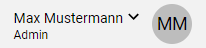
Die Rolle des aktiven Benutzers in der GridVis Cloud wird unterhalb des Benutzernamens, im rechten Bereich des Headers, angezeigt.
Hinweis
Die angezeigten Benutzerangaben werden aus der Janitza ID des aktuell verwendeten Benutzers übernommen.
Das Profilbild wird aus den Initialen des hinterlegten Benutzers zusammengestellt und ist nicht editierbar.