
| Sv translation | ||||||||||||||||||||||||||||||||||||||||||||||||||||||
|---|---|---|---|---|---|---|---|---|---|---|---|---|---|---|---|---|---|---|---|---|---|---|---|---|---|---|---|---|---|---|---|---|---|---|---|---|---|---|---|---|---|---|---|---|---|---|---|---|---|---|---|---|---|---|
| ||||||||||||||||||||||||||||||||||||||||||||||||||||||
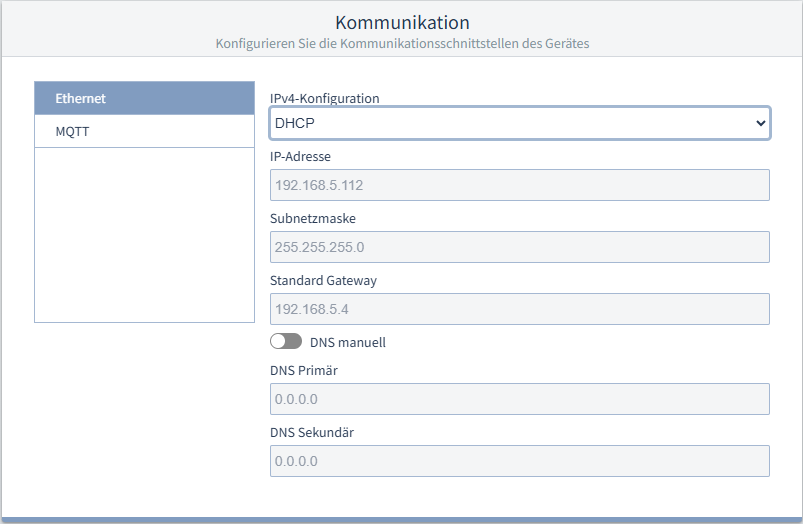
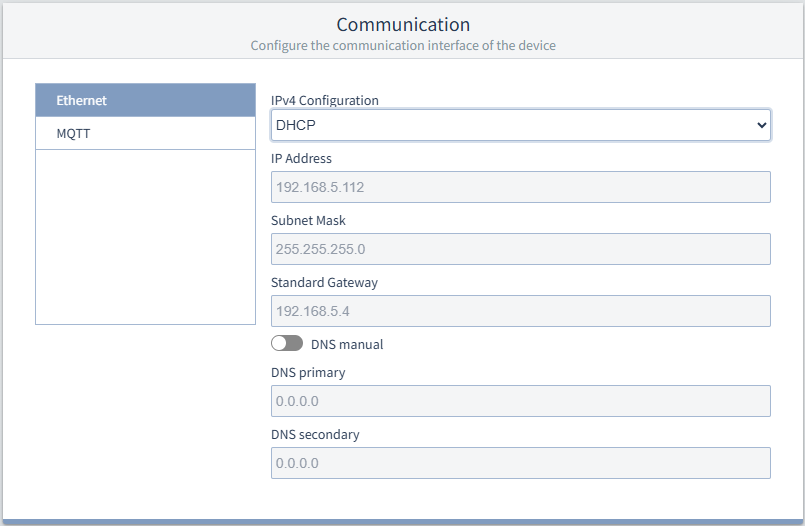
KommunikationEthernetKlicken Sie auf Ethernet, um die Einstellungen anzuzeigen. IPv4-KonfigurationSie können zwischen verschiedenen Arten der Adressvergabe im Netzwerk wählen:
Falls Sie sich für eine feste IP-Adresse entscheiden, müssen Sie die nachfolgenden Einstellungen konfigurieren : IP-Adresse, Subnetzmaske und Standard Gateway.
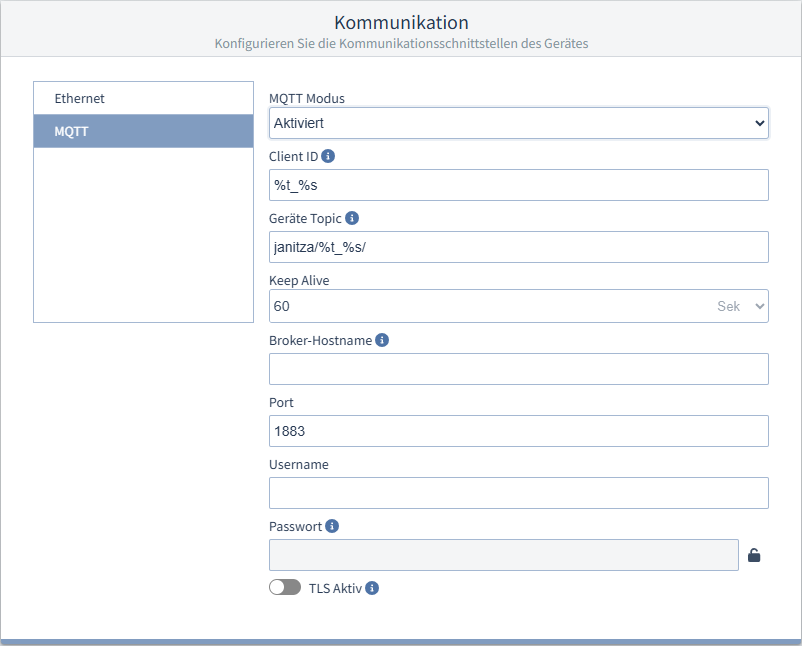
MQTT- EntwurfMQTT ist ein Kommunikationsprotokoll auf Basis eines Publish/Subscribe-Modells und eignet sich besonders für industrielle Netze, Energiemanagement-Systeme und IoT-Umgebungen. Nach der Einrichtung sendet das Messgerät konfigurierte Messwerte in regelmäßigen Intervallen als Nachrichtenpakete an einen Broker (publish). Andere Clients können die bereitgestellten Topics abonnieren (subscribe). Der Broker leitet die Nachrichtenpakete an diese Clients weiter. Das UMG 96-EL kann Nachrichten ausschließlich senden, nicht empfangen. MQTT-Kommunikation konfigurieren
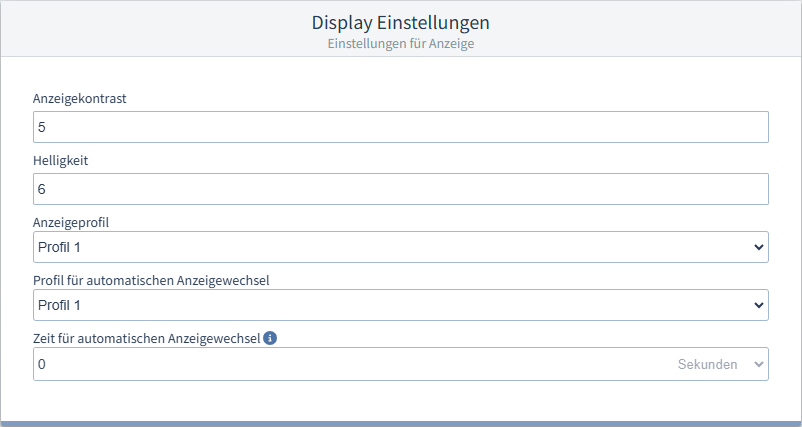
Display EinstellungenMit diese Einstellungen können Sie das Display an ergonomische Bedürfnisse anpassen. Reduzieren der Helligkeit spart Energie und kann die Lebensdauer des Displays verlängern. AnzeigekontrastDer Kontrast der LCD-Anzeige kann je nach Betrachtungswinkel angepasst werden. Der Kontrast ist von 0 bis 9 in 1er Schritten einstellbar:
Werkseitige Voreinstellung = 4 HelligkeitDie Helligkeit der LCD-Anzeige kann je nach Betrachtungswinkel angepasst werden. Die Helligkeit ist von 0 bis 9 in 1er Schritten einstellbar:
AnzeigeprofilDas Messgerät stellt 2 Anzeigeprofile mit unterschiedlicher Zusammenstellung von Messwertanzeigen zur Verfügung. Profil 1 ist die Voreinstellung. Durch Tastendruck am Gerät können Sie zur nächsten Anzeige aus dem gewählten Anzeigeprofil weiterschalten. Profil für automatischen AnzeigewechselDas Messgerät stellt 3 Profile für den automatischen Anzeigewechsel mit unterschiedlicher Zusammenstellung von Messwertanzeigen zur Verfügung. Wenn eine Zeit > 0 Sekunden eingestellt ist, wechselt die Anzeige automatisch zur nächsten Anzeige aus dem gewählten Anzeigewechsel-Profil. Zeit für automatischen AnzeigenwechselNach dieser Zeit zeigt das Display die nächste Messwertanzeige aus dem Profil für automatischen Anzeigewechsel an. Der automatische Anzeigenwechsel ist deaktiviert, wenn eine Zeit von 0 Sekunden eingestellt ist. Durch Tastendruck am Gerät können Sie zur nächsten Anzeige aus dem normalen Anzeigeprofil weiterschalten. Die maximale Zeit beträgt 60 Sekunden. Die Werkseinstellung beträgt 0 Sekunden.
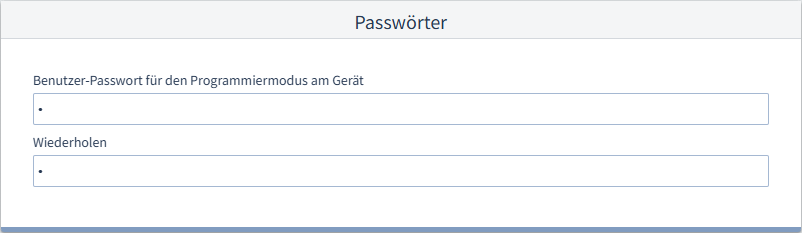
PasswörterBenutzer-Passwort für den Programmiermodus am GerätHier können Sie das Passwort ändern (000 .. 999), mit dem der Programmiermodus am Messgeräte-Display vor unberechtigtem Zugriff geschützt ist. In der Einstellung 000 findet keine Passwortabfrage statt.
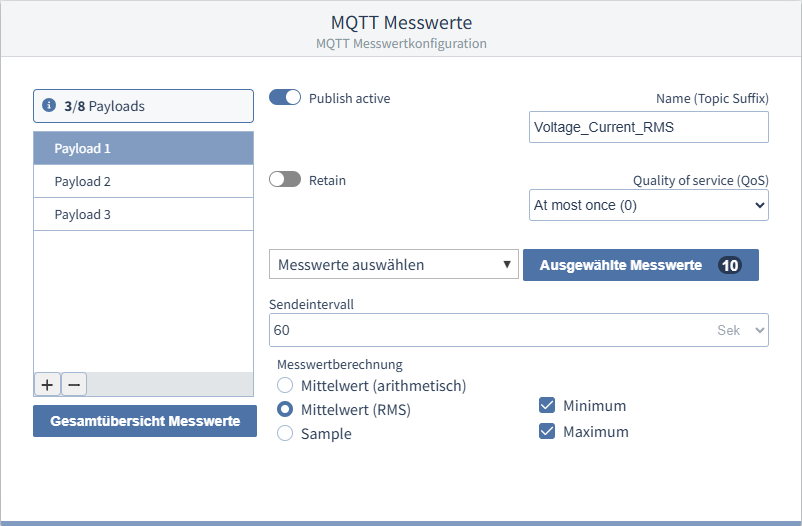
In der MQTT-Messwertkonfiguration lassen sich die Nachrichtenpakete konfigurieren, die der Broker an Clients sendet. Ein Nachrichtenpaket besteht aus einem Topic, der Payload und Flags.
Payload anlegen
|

| Sv translation | ||||||||||||||||||||||||||||||||||||||||||||||
|---|---|---|---|---|---|---|---|---|---|---|---|---|---|---|---|---|---|---|---|---|---|---|---|---|---|---|---|---|---|---|---|---|---|---|---|---|---|---|---|---|---|---|---|---|---|---|
| ||||||||||||||||||||||||||||||||||||||||||||||
Settings
CommunicationEthernetClick on Ethernet to display the settings. IPv4 configurationYou can choose between different types of address assignment in the network:
If you decide to use a fixed IP address, you must configure the following settings: IP address, subnet mask and standard gateway.
Display settingsThese settings allow you to adjust the display to suit ergonomic needs. Reducing the brightness saves energy and can extend the service life of the display. Display contrastThe contrast of the LCD display can be adjusted in dependence on the viewing angle. The contrast can be set from 0 to 9 in steps of 1:
Standard factory setting = 4 BrightnessThe brightness of the LCD display can be adjusted in dependence on the viewing angle. The brightness can be set from 0 to 9 in steps of 1:
Display profileThe measurement device provides 2 display profiles with different combinations of measuring displays. Profile 1 is the default setting. You can switch to the next display of the selected display profile by pressing a button on the device. Profile for automatic display changeThe measurement device provides 3 profiles for automatic display change with different combinations of measuring displays. If a time > 0 seconds is set, the display automatically switches to the next display of the selected display change profile. Time for automatic display changeAfter this time, the display shows the next measuring display of the profile for automatic display change. The automatic display change is deactivated if a time of 0 seconds is set. You can switch to the next display of the normal display profile by pressing a button on the device. The maximum time is 60 seconds. The factory setting is 0 seconds.
PasswordsUser password for the programming mode on the deviceYou can change the password here (000..999) that protects the programming mode on the measurement device display from unauthorized access. There is no password request with the setting 000.
| ||||||||||||||||||||||||||||||||||||||||||||||
| Sv translation | ||||||||||||||||||||||||||||||||||||||||||||||
|
| Inhalt |
|---|
Comunicazione
Ethernet
Fare clic su Ethernet per visualizzare le impostazioni corrispondenti.
Configurazione IPv4
È possibile scegliere tra diversi tipi di allocazione degli indirizzi nella rete:
- Indirizzo IP fisso (statico): assegnazione permanente dell’indirizzo IP, della netmask (maschera di rete) e del gateway al dispositivo ("Statico"). Utilizzare questa modalità per reti semplici senza server DHCP.
- DHCP: All’avvio dello strumento di misura viene assegnato automaticamente un indirizzo IP. I seguenti campi vengono riempiti automaticamente con i valori assegnati e sono in grigio.
- Indirizzo IP fisso con test ARP: Assegnando l’indirizzo IP, la netmask (maschera di rete) e il gateway al dispositivo in modo permanente, il dispositivo si registra automaticamente nella rete con l’indirizzo IP e MAC ("Static Gratuitous ARP").
Se si decide di utilizzare un indirizzo IP fisso, è necessario configurare le seguenti impostazioni: Indirizzo IP, Subnet mask e Gateway standard.
MQTT
MQTT is a communication protocol based on a publish/subscribe model and is particularly well-suited for industrial networks, energy management systems, and IoT environments.
After setting up MQTT communication, the measurement device sends the configured data to the broker as message packets at regular intervals. Other clients can subscribe to the published topics. The broker forwards the message packets to these clients. The UMG 96-EL can only send messages; it cannot receive them.
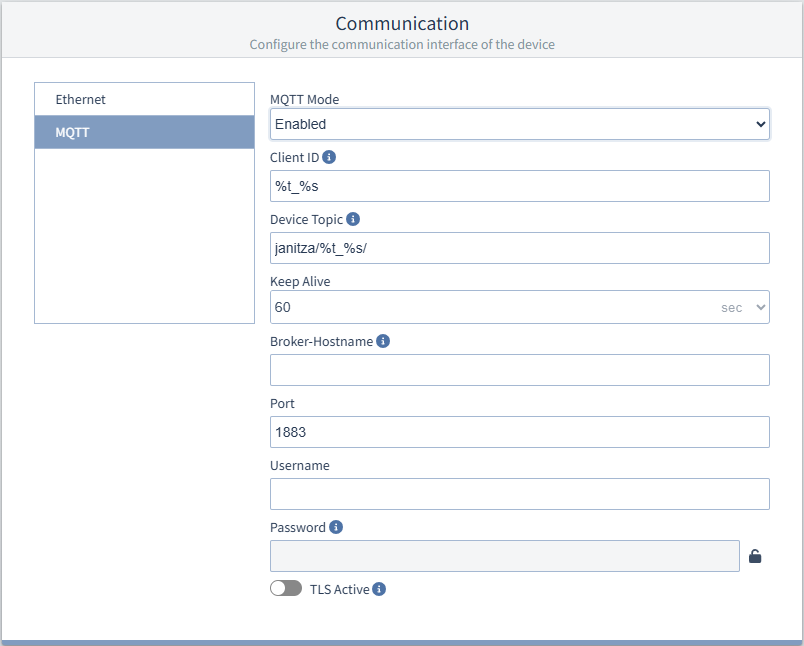
Configure MQTT communication
- Select MQTT in the Communication section.
- If MQTT mode is disabled, change it to Enabled using the dropdown menu.
- Fill in the remaining fields:
Input Options Description Client ID Anker Geräte Topic Geräte Topic - Unique ID for the broker connection
- max. 23 characters
The client is an end device that sends or receives
messages. This role in communication is performed
by measurement devices as well as mobile devices
or higher-level systems. The client requires a unique ID for the broker connection.Device Topic
- max. 127 characters
The device topic is the first part of a topic. The second part of the topic is the payload name (topic suffix); see MQTT Measurements).
A topic is a category or subject assigned to
a message that helps filter messages. Clients can
subscribe to specific topics to receive messages
on that topic.Keep Alive - 0 - 65535 s Interval
- Default: 60 s
- 0 s = Keep Alive is inactive
Keep Alive is a mechanism whereby
clients periodically send signals to the broker to
maintain their connection.Broker-Hostname - FQDN or IP adress
- max. 127characters
FQDN or IP address of the broker if DNS is disabled.
Port
- 1 - 65535
Username and Password
- Username: max. 63 characters
- Passwort: max. 1024 characters
Unencrypted authentication
- Click the
 -button to edit the password.
 - Click the -button to close the editor without saving the new password.
Enable TLS encryption using the TLS Active switch. Additionally, you can configure and combine further authentication options:
Server CA (TLS Server CA certificate, max. 4096 bytes)
Client Key (private key, max. 2048 bytes)
Client Certificate (max. 4096 bytes)
Configure the messages sent via MQTT in the MQTT Measurements section.
Display settings
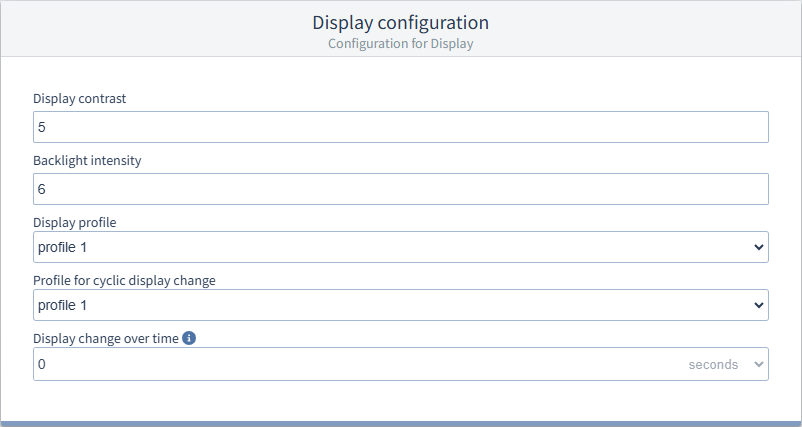
These settings allow you to adjust the display to suit ergonomic needs. Reducing the brightness saves energy and can extend the service life of the display.
Display contrast
The contrast of the LCD display can be adjusted in dependence on the viewing angle. The contrast can be set from 0 to 9 in steps of 1:
- 0 = low, character very bright
- 9 = high, character very dark
Standard factory setting = 4
Brightness
The brightness of the LCD display can be adjusted in dependence on the viewing angle. The brightness can be set from 0 to 9 in steps of 1:
- 0 = low, character very bright
- 9 = high, character very dark
Display profile
The measurement device provides 2 display profiles with different combinations of measuring displays. Profile 1 is the default setting.
You can switch to the next display of the selected display profile by pressing a button on the device.
Profile for automatic display change
The measurement device provides 3 profiles for automatic display change with different combinations of measuring displays.
If a time > 0 seconds is set, the display automatically switches to the next display of the selected display change profile.
Time for automatic display change
After this time, the display shows the next measuring display of the profile for automatic display change.
The automatic display change is deactivated if a time of 0 seconds is set. You can switch to the next display of the normal display profile by pressing a button on the device.
The maximum time is 60 seconds.
The factory setting is 0 seconds.
Passwords
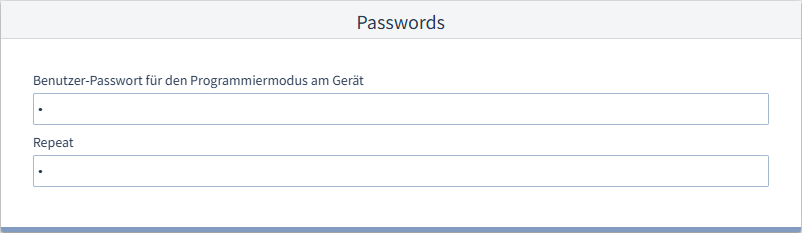
User password for the programming mode on the device
You can change the password here (000..999) that protects the programming mode on the measurement device display from unauthorized access. There is no password request with the setting 000.
| Info | ||
|---|---|---|
| ||
Write down the new password and keep it in a safe pace for authorized persons! If you lose your password, you will need the GridVis software to reset the user password. |
| Anker | ||||
|---|---|---|---|---|
|
In the MQTT measuring value configuration, you can configure the message packets that the broker sends to clients. A message packet consists of a topic, the payload, and flags.
| Term | Description |
|---|---|
| Topic | Topics are used to categorize messages by subject. Topics can be freely defined and have a two-part structure:
The Device Topic applies to all payloads of the device; the Name applies specifically to a single payload. |
| Payload | A payload is the content of a message. |
| Flags | Flags mark messages for the broker (e.g., retain) and are invisible to users. Retain: If a message is marked with the “Retain” flag, it is stored by the broker and sent to every client that newly subscribes to this topic. |
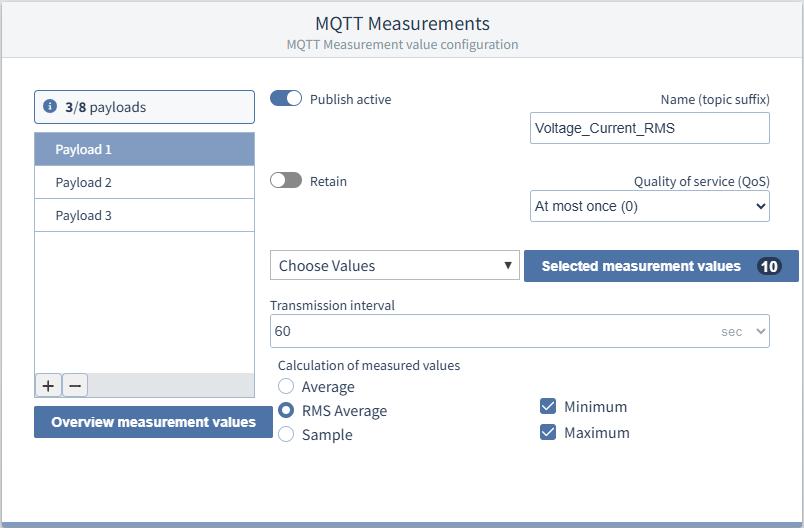
Create Payload
- Create a payload using the + button.
- Enable the Publish active switch so that the device sends data to the broker.
- If you want the broker to store a message and send it to all clients who subscribe to it, enable the Retain switch.
- Give the payload a Name (Topic Suffix).
- Select the Quality of Service (QoS):
- At most once (0): The device sends the message only once and does not expect a confirmation of receipt. The reliability of delivery depends on the stability of
the TCP connection. - At least once (1): The measurement device sends the message and the broker sends a confirmation of receipt. If the measurement device does not receive a confirmation of receipt, it sends the message again once every second until the next transmission interval begins or until receipt has been confirmed by the broker.
- At most once (0): The device sends the message only once and does not expect a confirmation of receipt. The reliability of delivery depends on the stability of
- Select the desired measuring values using the checkboxes in the Choose Values dropdown menu.
- Specify the transmission interval at which the broker sends messages to the clients.
- Select the measurement value calculation::
- Average value (arithmetic): Arithmetic average of the measuring values over the specified time interval.
- Root Mean Square (RMS): Effective average value of the measuring values over the specified time interval.
- Sample: Measuring value (instantaneous value) at the end of the specified time interval; no averaging is performed.
- Minimum: Minimum values of the time interval
- Maximum: Maximum values of the time interval
| Sv translation | |||||||||||||||||||||||||||||||||||||||||||||||
|---|---|---|---|---|---|---|---|---|---|---|---|---|---|---|---|---|---|---|---|---|---|---|---|---|---|---|---|---|---|---|---|---|---|---|---|---|---|---|---|---|---|---|---|---|---|---|---|
| |||||||||||||||||||||||||||||||||||||||||||||||
Impostazioni:
ComunicazioneEthernetFare clic su Ethernet per visualizzare le impostazioni corrispondenti. Configurazione IPv4È possibile scegliere tra diversi tipi di allocazione degli indirizzi nella rete:
Se si decide di utilizzare un indirizzo IP fisso, è necessario configurare le seguenti impostazioni: Indirizzo IP, Subnet mask e Gateway standard.
MQTT MQTT è un protocollo di comunicazione basato su un modello publish/subscribe ed è particolarmente indicato per reti industriali, sistemi di gestione dell'energia e ambienti IoT. Dopo la configurazione della comunicazione MQTT, lo strumento di misura invia a intervalli regolari i dati impostati come pacchetti di messaggi al broker (publish). Altri client possono iscriversi (subscribe) agli argomenti (topics) pubblicati. Il broker inoltra i pacchetti di messaggi a questi client. L’UMG 96-EL può esclusivamente inviare dati. Configurare la comunicazione MQTT
Impostazioni del displayCon queste impostazioni è possibile regolare il display in base alle proprie esigenze ergonomiche. Riducendo la luminosità si risparmia anche energia ed è possibile prolungare la durata del display. Contrasto del displayIl contrasto del display LCD può essere regolato in base all’angolo di visione. Il contrasto può essere impostato da 0 a 9 in incrementi di 1:
Preimpostazione di fabbrica = 4 LuminositàLa luminosità del display LCD può essere regolata in base all’angolo di osservazione. La luminosità può essere impostata da 0 a 9 in incrementi di 1:
Profilo di visualizzazioneLo strumento di misura offre 2 profili di visualizzazione con diverse combinazioni di visualizzazione delle letture. Il profilo 1 è l’impostazione predefinita. È possibile passare alla visualizzazione successiva del profilo di visualizzazione selezionato premendo un pulsante del dispositivo. Profilo per il cambio automatico del displayLo strumento mette a disposizione 3 profili per il cambio automatico delle schermate, ognuno con una diversa combinazione di valori misurati. Se si imposta un tempo > 0 secondi, il display passa automaticamente alla visualizzazione successiva del profilo di modifica del display selezionato. Tempo per il cambio automatico del displayTrascorso questo intervallo di tempo, il display mostra la schermata delle letture successiva dal profilo per la modifica automatica della schermata. Il cambio automatico della schermata è disattivato se si imposta un intervallo di 0 secondi. È possibile passare alla visualizzazione successiva del profilo di visualizzazione normale premendo un pulsante del dispositivo. Il tempo massimo impostabile è 60 secondi. L’impostazione di fabbrica è di 0 secondi.
PasswordPassword utente per la modalità di programmazione del dispositivoQui è possibile modificare la password (000 .. 999), che protegge la modalità di programmazione sul display dello strumento di misura dall’accesso non autorizzato. Se è impostato 000 non viene richiesta alcuna password.
Nella configurazione dei valori di misura MQTT è possibile configurare i pacchetti di messaggi che il broker invia ai client. Un pacchetto di messaggi è costituito da un argomento, dal payload e dai flag.
Creare un payload
|
| Sv translation | |||||||||||||||||||||||||||||||||||||||||
|---|---|---|---|---|---|---|---|---|---|---|---|---|---|---|---|---|---|---|---|---|---|---|---|---|---|---|---|---|---|---|---|---|---|---|---|---|---|---|---|---|---|
| |||||||||||||||||||||||||||||||||||||||||
ComunicaciónEthernetHaga clic en Ethernet para visualizar los ajustes. Configuración IPv4Usted puede seleccionar diferentes tipos de asignación de la dirección en la red:
Si usted se decide por una dirección IP fija, deberá configurar los siguientes ajustes: IP Address (Dirección IP), Subnet Mask (Máscara de subred) y Standard Gateway (Pasarela estándar).
MQTT MQTT es un protocolo de comunicación basado en un modelo de publicación/suscripción y resulta especialmente adecuado para redes industriales, sistemas de gestión energética y entornos de IoT. Tras configurar la comunicación MQTT, el dispositivo de medición envía los datos configurados, por ejemplo, valores de energía, al broker en forma de paquetes de mensajes a intervalos regulares. Otros clientes pueden suscribirse a los temas publicados. El broker reenvía los paquetes de mensajes a estos clientes. El UMG 96-EL solo puede enviar datos (publicar). Configurar la comunicación MQTT
Ajustes de pantallaEstos ajustes le permiten adaptar la pantalla a las necesidades ergonómicas. La reducción del brillo ahorra energía y puede prolongar la vida útil de la pantalla. Contraste de la pantallaEl contraste de la pantalla LCD puede adaptarse en función del ángulo de visión. El contraste puede ajustarse en pasos de 1 en un rango de 0 a 9:
Preajuste de fábrica = 4 BrilloEl brillo de la pantalla LCD puede adaptarse en función del ángulo de visión. El brillo puede ajustarse en pasos de 1 en un rango de 0 a 9:
Perfil de la pantallaEl dispositivo de medición pone a disposición 2 perfiles de pantalla con una composición diferente de indicaciones de valores de medición. El perfil 1 es el preajuste. Pulsando una tecla en el dispositivo podrá pasar a la siguiente indicación del perfil de pantalla seleccionado. Perfil para cambio automático de indicaciónEl dispositivo de medición pone a disposición 3 perfiles para el cambio automático de pantalla con una composición diferente de indicaciones de valores de medición. Si está ajustado un tiempo > 0 segundos, la pantalla cambia automáticamente a la siguiente indicación del perfil de pantalla seleccionado. Tiempo para cambio automático de indicaciónDespués de este tiempo, la pantalla muestra la siguiente indicación de valores de medición del perfil para el cambio automático de indicación. El cambio automático de indicación está desactivado si está ajustado un tiempo de 0 segundos. Pulsando una tecla en el dispositivo podrá pasar a la siguiente indicación del perfil de pantalla normal. El tiempo máximo es de 60 segundos. El ajuste de fábrica es de 0 segundos.
ContraseñasContraseña de usuario para el modo de programación en el dispositivoAquí podrá cambiar la contraseña (000 .. 999) mediante la cual el modo de programación en la pantalla del dispositivo de medición está protegido contra un acceso no autorizado. Con el ajuste 000 no se solicita ninguna contraseña.
Valores de medición MQTTEn la configuración de valores de medición MQTT se pueden configurar los paquetes de mensajes que el broker envía a los clientes. Un paquete de mensajes consta de un tema, la carga útil y los indicadores.
Crear carga útil
|
| Info | ||
|---|---|---|
| ||
Annotare la nuova password e comunicarla solo alle persone autorizzate! Se si perde la password, è necessario il software GridVis per reimpostarla. |
| language | es |
|---|
Ajustes:
| Inhalt |
|---|
Comunicación
Ethernet
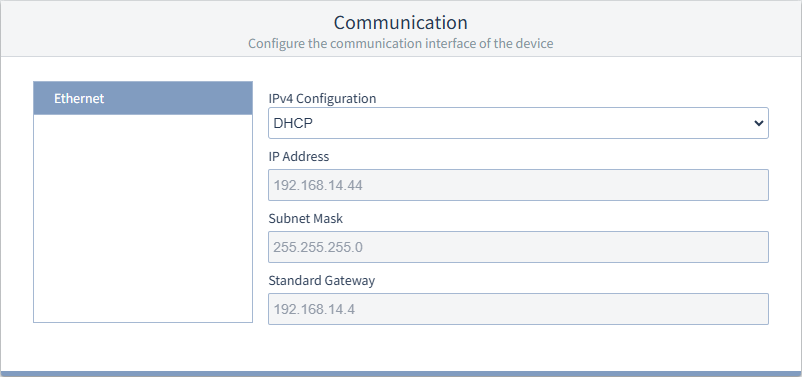
Haga clic en Ethernet para visualizar los ajustes.
Configuración IPv4
Usted puede seleccionar diferentes tipos de asignación de la dirección en la red:
- Dirección IP fija (estática): asigne fijamente ("estáticamente") la dirección IP, la máscara de red y la pasarela al dispositivo. Utilice este modo para redes sencillas sin servidor DHCP.
- DHCP: durante el arranque se asigna automáticamente una dirección IP al dispositivo de medición. Los siguientes campos se rellenan automáticamente con los valores asignados y están atenuados.
- Dirección IP fija con test ARP: asigne de manera fija la dirección IP, la máscara de red y la pasarela al dispositivo, este inicia automáticamente la sesión en la red con la dirección IP y MAC ("Statisch Gratuitous ARP").
Si usted se decide por una dirección IP fija, deberá configurar los siguientes ajustes: IP Address (Dirección IP), Subnet Mask (Máscara de subred) y Standard Gateway (Pasarela estándar).
Ajustes de pantalla
Estos ajustes le permiten adaptar la pantalla a las necesidades ergonómicas. La reducción del brillo ahorra energía y puede prolongar la vida útil de la pantalla.
Contraste de la pantalla
El contraste de la pantalla LCD puede adaptarse en función del ángulo de visión. El contraste puede ajustarse en pasos de 1 en un rango de 0 a 9:
- 0 = bajo, caracteres muy claros
- 9 = alto, caracteres muy oscuros
Preajuste de fábrica = 4
Brillo
El brillo de la pantalla LCD puede adaptarse en función del ángulo de visión. El brillo puede ajustarse en pasos de 1 en un rango de 0 a 9:
- 0 = bajo, caracteres muy claros
- 9 = alto, caracteres muy oscuros
Perfil de la pantalla
El dispositivo de medición pone a disposición 2 perfiles de pantalla con una composición diferente de indicaciones de valores de medición. El perfil 1 es el preajuste.
Pulsando una tecla en el dispositivo podrá pasar a la siguiente indicación del perfil de pantalla seleccionado.
Perfil para cambio automático de indicación
El dispositivo de medición pone a disposición 3 perfiles para el cambio automático de pantalla con una composición diferente de indicaciones de valores de medición.
Si está ajustado un tiempo > 0 segundos, la pantalla cambia automáticamente a la siguiente indicación del perfil de pantalla seleccionado.
Tiempo para cambio automático de indicación
Después de este tiempo, la pantalla muestra la siguiente indicación de valores de medición del perfil para el cambio automático de indicación.
El cambio automático de indicación está desactivado si está ajustado un tiempo de 0 segundos. Pulsando una tecla en el dispositivo podrá pasar a la siguiente indicación del perfil de pantalla normal.
El tiempo máximo es de 60 segundos.
El ajuste de fábrica es de 0 segundos.
Contraseñas
Contraseña de usuario para el modo de programación en el dispositivo
Aquí podrá cambiar la contraseña (000 .. 999) mediante la cual el modo de programación en la pantalla del dispositivo de medición está protegido contra un acceso no autorizado. Con el ajuste 000 no se solicita ninguna contraseña.
| Info | ||
|---|---|---|
| ||
¡Anote la contraseña nueva y guárdela de forma segura para las personas autorizadas! En el caso de perder la contraseña, necesitará el software GridVis para restablecer la contraseña del usuario. |